
End-of-Year Google Workspace Audit for School Admins
Review critical aspects of your Google domain to enhance security, compliance, and management for the following school year. GAT Labs’ visibility, security reports, and automation make the annual audit a hassle-free routine task.
SCHOOL ADMIN CHALLENGE
Complex Google Workspace Environments Need Comprehensive Controls
Massive Manual Offboarding
Unmonitored Sensitive Data Access
Online Safety & Compliance Gaps
GAT Labs Solution
In-depth Google Workspace Audit with One Toolset
In-depth Overview of Every Action Across the Domain
Security Audit within Google Workspace and the Chrome Browser
Online Safety Policies Check
Automated, Customizable Workflows
Ongoing Monitoring, Alerting & Reporting
Your Annual Overview of Google Workspace for Education with GAT Labs
Audit your Google Workspace for Education environment with precision and confidence. We will guide you through key aspects of your domain to increase visibility, clean up waste, and protect your sensitive data.
ESSENTIAL FEATURES
Google Workspace Auditing
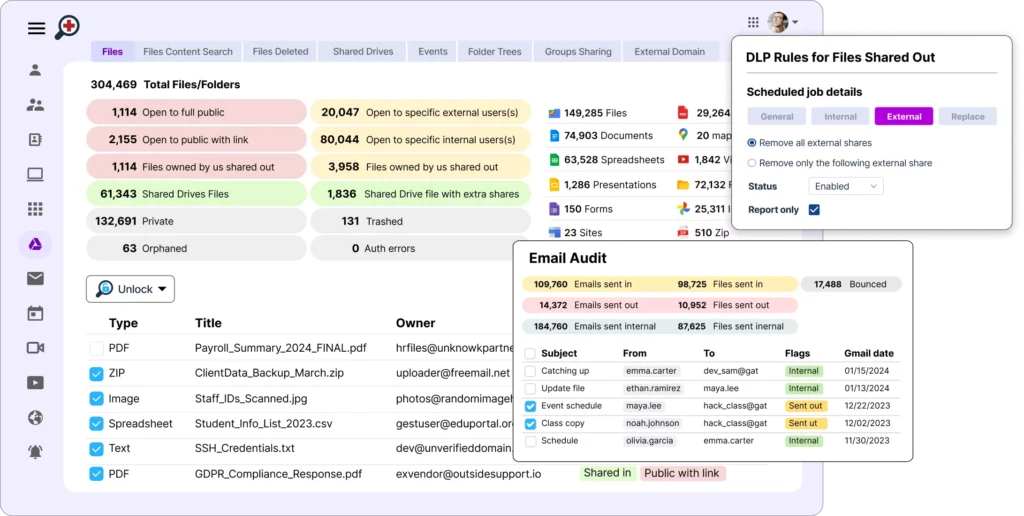
- Detailed Reporting: Full overview of user access, online activity, and data lifecycle.
- Data Filtering: Advanced filters help structure information and identify trends.
- Automation: Domain data is automatically collected and shown in scheduled reports.
- Risk Management: Security threat detection, data protection monitoring, policies oversight. data is automatically collected and shown in scheduled reports.
- Seamless Integration: GAT Suite is fully integrated with the Google Workspace environment.
FREQUENTLY ASKED QUESTIONS
Google Workspace Audit for Schools
How to effectively audit activity across Google Workspace for Education?
What are the most common issues discovered during a Google Workspace audit?
Can admins audit external files shared in their Google Drive?
How can we verify that our Google Workspace environment complies with FERPA and student privacy requirements?
How do we transfer ownership of files when a teacher or staff member leaves?
Which third-party applications have access to our Google Workspace data?
How can we verify that Multi-Factor Authentication is enabled for all school staff?
How do we find inactive or unused Google Workspace accounts?
How can we identify files shared publicly or with external users?
Are our Google Workspace security settings configured according to best practices?
To optimize security setup in Google Workspace for Education, check out our resources designed for school admins. You can also talk to our Support Team to review your current settings and enhance security auditing and management practices together.
Secure Your Google Workspace for Next School Year
Identify critical areas, safeguard sensitive information, and protect your students online. Audit your Google environment regularly with a toolset that digs deeper into data than any other solution. Join thousands of schools that gained unprecedented visibility and control over their domains.
- Why is an end-of-year audit critical for maintaining data security and tenant hygiene in Google Workspace for Education?
- What are the best practices for handling graduating students and departing staff accounts to ensure seamless data offboarding?
- How can school IT administrators safely transfer file ownership from ex-staff members without losing critical institutional data?
- What security risks are associated with leaving idle or orphan shared files unmanaged over the summer break?
- How can GAT Flow automate repetitive bulk tasks like updating Organizational Units (OUs) and mass-modifying user accounts during school year transitions?
- What steps should admins take to clean up, optimize, and free up domain storage before Google's storage policies impact the school's budget?
- How does auditing third-party app permissions at the end of the term help reduce a school district's "shadow IT" footprint?