Keeping Students Focused in Class Is Harder Than Ever.
Using virtual classrooms gives schools not only flexibility and access to edtech but also increases online distractions when unmonitored.
Teachers, instead of focusing on the class, have to manually control each student’s behavior to keep them focused. They compete with attractive online content, which usually wins over demanding, slow-paced lessons.
Without real-time monitoring of classrooms, learning performance drops significantly. A lack of classroom insights hinders the tracking and evaluation of student progress.
At GAT Labs, we’ve designed tools to face these challenges successfully.
GAT Labs’ Solution:
Real-time Google Classroom Monitoring
Our solutions enhance everyone’s experience in Google Classroom by reducing online distractions, improving student engagement, and enhancing teaching performance.
For Teachers
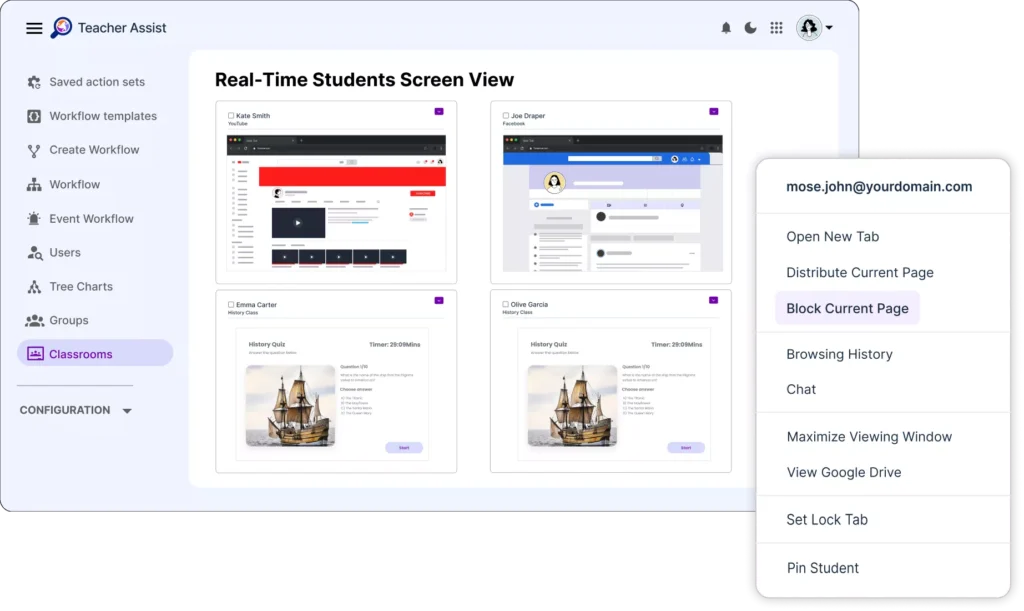
Reclaim Live Student Screen Control with Teacher Assist
Real-time monitoring of each student’s screen in the Chrome browser, websites & tabs management, quick actions to refocus student attention.
For School Admins
Track Student Browsing Activity with GAT Shield
Oversight over online usage of AI-powered tools in Google Classroom. Risk assessment and app access policies customization to prevent accidental data leaks.
For School Leaders
Gain High-Level Visibility into Classrooms with GAT+
Full insights for each classroom and student performance, including attendance, engagement, student submission summary, grades, and more.
How to Monitor Students in Google Classroom?
Monitoring large classrooms can be challenging without centralized, automated management tools. Collaboration of teachers and admins is essential to ensure efficient tracking of students’ online activity and progress.
GAT Labs enables controlling each student’s activity in the Chrome browser through:
Real-time Screen Content Oversight
Web browsing control and screen view management at the student and classroom scale.
Web Filtering Customization
Restrictions on inappropriate and distracting online content adjusted to your school’s policy.
Live Classroom Interactions
Student-teacher communication via live chat and classroom announcements.
Screen Locking
Online distractions are removed during exams and other critical activities.
Student Progress Reporting
Grade and assignment completion tracking via access to student Drive files.
“Using Teacher Assist from GAT Labs, we’ve seen fewer students opening unrelated websites during lessons, and it’s now easier to spot those who are disengaged. It’s reduced the need for teachers to constantly patrol the classroom just to check screens.”
IT Managed Service Lead
Beacon High School in Islington, London
How GAT Labs Helps with Classroom Safety and Compliance
Educational institutions are required to demonstrate that they monitor safety in Google Classroom to comply with FERPA, COPPA, GDPR, and CIPA regulations.
GAT Labs’ tools, fully integrated with the Google Workspace for Education environment, offer schools a complete overview of their classrooms:
Searchable audit logs of student browsing activity
Website access policies and enforcement controls
Configurable alert rules for school policy violations
Scheduled and on-demand compliance reports
Exportable evidence for internal reviews or regulatory audits
Artificial Intelligence and Academic Integrity in Google Classroom
How to prevent "second-screening" and online distractions in Google Classroom in 2026?
By effectively controlling student browsing during a class. With Teacher Assist, educators can oversee each student’s screen and manage their entire online activity within the Google account. They can customize screen content by switching tabs, delivering lessons, and supervising web browsing to maintain student attention.
Can schools perform live student screen monitoring across Chrome, Mac, and Windows devices?
Yes. GAT Labs monitors student online activity through the Chrome browser. For admins, it allows tracking browsing and applying web filtering rules. Teachers can monitor students’ screens in real time during a Google Classroom session.
How does advanced web filtering support students' focus on the class?
Highly customized filtering of online content reduces distractions for students while allowing access to educational online sources in the classroom. Automated alert rules notify admins of attempts to access unapproved content and help to redirect their attention back to the class.
GAT Labs Blog Posts on Classroom Monitoring
How to Keep Students Focused During Holiday Distractions in the Virtual Classroom
In a world saturated with online distractions, only real-time monitoring and effective classroom management can maintain student attention during class.
Discover how to enhance your learning performance, personalize teaching, and reduce online noise with GAT Labs.