Keep Every School Email Consistent, Professional and Up to Date
Every email represents your school.
Manage staff signatures centrally across Google Workspace for Education, keeping contact details, school information, disclaimers and important links accurate without asking teachers and staff to update them manually.
Email Signatures Shouldn't Become Another School Admin Task
Staff join, change roles, move between schools or departments, and contact information changes throughout the year.
Without central management, IT teams have to rely on every member of staff to keep their signature accurate.
Email Signature Manager handles that centrally, so teachers can focus on teaching and IT has one less repetitive task to manage.
Once your rules are in place, the correct signature is automatically applied to the right users.
From Template to Every Inbox
Create once, assign to users or groups, and ensure every email stays compliant, consistent, and on-brand without ongoing admin effort.
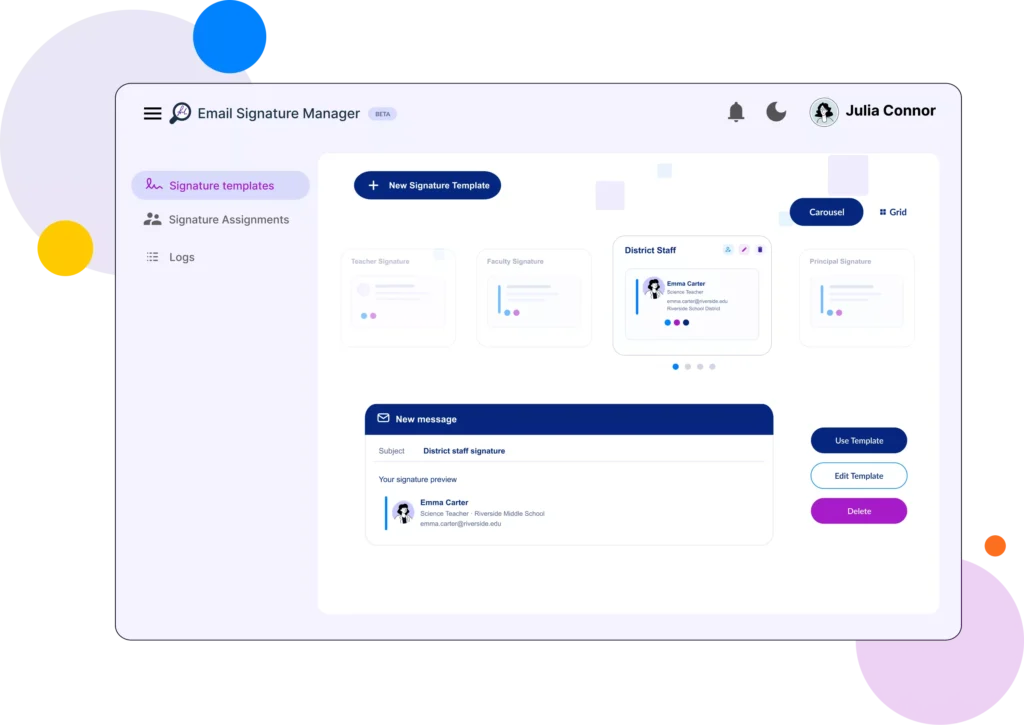
Create Your Signature
- Build your signature using a predefined template or custom HTML.
- Add your logo, school colors, social links, website, and dynamic user information.
Choose Who Gets It
- Assign the right signature to teachers, faculty, administrative teams, specific users, Google Groups, or entire Organizational Units.
- You can create different signatures for different teams and apply priority rules to ensure the correct signature is used when assignments overlap.
Let It Run
- Once configured, signatures are automatically applied every day to the users you select.
- Daily enforcement keeps the correct signature in place without admins having to repeatedly push updates or rely on users to manage their own signatures.
The Right Signature for Every Team.
Automatically.
Give faculty and staff the right email signature while managing branding, details, and updates centrally.
School Leadership:
Keep leadership communications professional and consistent.
Ensure headteachers, principals, department leaders, and administrators use signatures with accurate titles, school information, and approved messaging. Make changes centrally as responsibilities or school details change.
Teachers & Faculty
Keep staff details accurate without asking teachers to update them.
Automatically apply signatures with the correct name, role, department, school details, and contact information. When staff details change, update them centrally so teachers can focus on teaching instead of managing their signatures.
Admissions & Enrollment
Promote open days, enrollment information, and important resources.
Give admissions teams consistent signatures with the right school details, contact information, application links, and upcoming events. Update campaigns centrally when enrollment priorities change.
Districts & Multi-School Trusts
Manage different schools and identities from one place.
Create and assign the right signatures for individual schools, departments, or groups while managing everything centrally. Each school can maintain its own identity and contact details without creating more work for IT.
IT Administration
Automate deployment and stop managing individual signatures.
Assign signatures by user, group, or organisational unit and automatically apply the right template as staff join, change roles, or move departments. Daily enforcement helps keep approved signatures in place without repeated manual intervention.
Communications Teams
Roll out announcements, events, campaigns, and new branding centrally.
Turn everyday staff emails into another way to share important school communications. Add banners, links, events, or updated branding to the right signatures and roll out changes without relying on individual staff members.
Make School-Wide Updates Once
You shouldn’t have to send instructions across your school and hope everyone updates correctly.
Make the change centrally, and Email Signature Manager handles the application for you.
Once your rules are in place, the correct signature is automatically applied to the right users.
Email Signature Manager Features
Built to Scale With Your School
Whether you’re managing 20 users or 20,000, Email Signature Manager makes it easy to keep every signature consistent, accurate, and up to date.
Flexible Signature Templates
- Create reusable templates for different departments, regions, or brands.
Intelligent Assignments
- Apply signatures by user, group or organizational unit with configurable priorities.
Rich HTML Editor
- Import existing signatures from other platforms with full HTML support.
Dynamic Employee Information
- Automatically populate signatures using Google Workspace directory data and custom attributes, helping keep staff details accurate across your school or district.
Rich Media & Reliable Image Hosting
- Use animated GIFs and high quality images for promotions and branding. Images are automatically stored in your school's shared Google Drive for reliable delivery without relying on third party hosting.
Automatic Signature Enforcement
- Keep staff signatures aligned with school standards. Email Signature Manager checks them daily and automatically reapplies the approved version when needed.
Built In Activity Logs
- Track administrative actions within Email Signature Manager, providing visibility into changes and helping support accountability.
Preview Before Deployment
- See exactly how each staff member’s signature will look before deployment.