
It’s beginning to look a lot like Christmas
Everywhere you go
Take a look at your email inbox, it’s filling up once again
With fake discounts and brilliant scams that urge…”
Did you know that over 50% of US-based scam victims who lost money were students under 19? They lost a total of $55 million to cybercriminals, according to a federal study.
For school admins, holiday scams pose another huge challenge amid the hectic final month of the year. However, ignoring seasonal fraud in Gmail can significantly disrupt the festive atmosphere. Here is how to avoid it.
Common Holiday Season Scams at School
December is a busy month for educational institutions: teachers are trying to keep up with classes until the holiday break, students are distracted by the Christmas spirit, and school leadership is closing current projects and polishing plans for the following fiscal year.
A lot is going on, which makes it easier for people to drop their guard
This is prime time for scammers targeting school email accounts. Now, it’s easier than ever to steal Gmail users’ personal data and money.
That’s what you can expect this December:
- Fake Christmas Offers: Great discounts, unbelievable promotions, generous gift cards, and festive competition fraud. They usually look too good to be true; if they appear to be organized or endorsed by the school, first confirm this officially with the principal’s office.
- Funding Scams: Charity scams requesting donations for school funds and unexpected payment requests to students, parents, and school staff. Before sending any money, double-check this in person or by phone with the potential fundraiser.
- Holiday-Themed Phishing Emails: Demanding messages from scammers posing as school staff and requesting urgent action (e.g., clicking a link to confirm attendance at the Christmas party or entering a holiday raffle). Complying with these requests could put the school’s cybersecurity at risk.
- Suspicious Downloads: Emails from unknown senders who share “Holiday apps” to add a festive theme to your device, and other downloadable files from suspicious pages. They may install malicious software to steal personal data or lock it and demand a ransom.
Why Schools Are Easy to Catch by Scammers
The educational sector is full of large targets and easy prey for hackers. Schools become victims of phishing and other cyber threats for the following reasons:
- Low Cybersecurity Awareness: That’s a key problem among both teachers and students. While you can’t expect them to be cybersecurity experts, you can train them on best practices for protecting school digital assets. If you’re too busy, outsource this to a specialized NGO and include it in your next year’s budget. Cybersecurity education is essential to maintaining a safe school environment and to shaping digitally aware citizens.
- Short Cybersecurity Budget: Some schools don’t prioritize cybersecurity, which is fundamental to safeguarding the learning environment. When reorganizing the school IT budget to address security issues, opt for all-in-one solutions rather than a range of different products to optimize your time and effort in daily operations.
- Valuable School Data: School storage contains sensitive data that hackers could exploit for malicious purposes. Personal records, grading sheets, health reports, or credit card numbers can be stolen and sold, publicly disclosed, or encrypted and held for ransom. In any case, this incident would personally damage the victims and the school as an institution.
- Overloaded IT Staff: Sometimes, a single IT employee has to manage the entire school system. Even worse, they may also be responsible for technical maintenance and inventory management, which makes it impossible to address cybersecurity properly. Additionally, during the peak season, IT teams are particularly overwhelmed by a never-ending to-do list and focused on completing urgent, ad hoc requests.
How to Detect Email Scams in the School
Your users – students, teachers, and school staff – are your first line of defence against scams and phishing. Their high awareness of this cyber threat will reduce additional administrative work, protect the school’s money and reputation, and reduce stress for everyone.
Look for these early warning signs in the email inbox:
- Unexpected emails from unknown senders
- Small, weirdly named, unexpected attachments
- Urgent requests to take action
- Misspelled words and grammar errors
- Fake logos and poor design
- The email address and the sender’s name don’t match
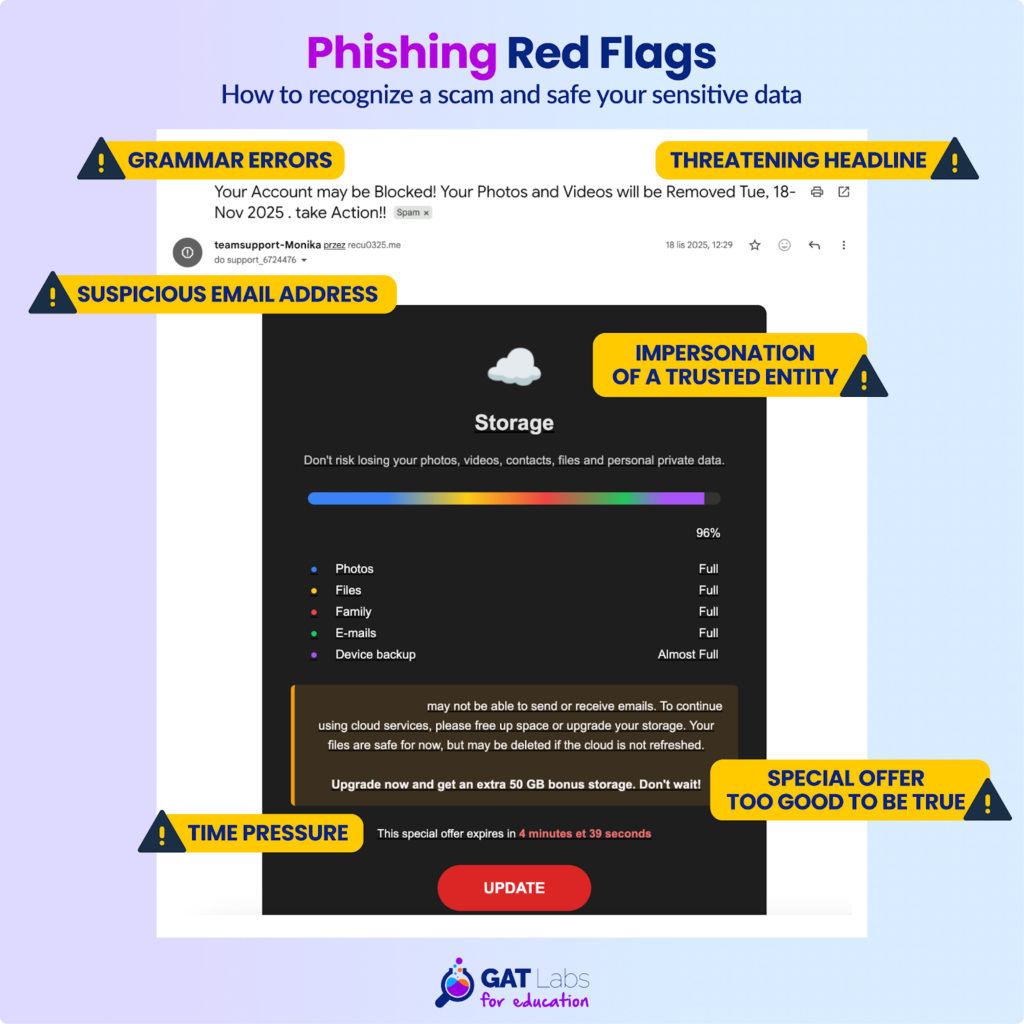
A real-life example of a scam email
How to Avoid Holiday Phishing in the School’s Gmail
Sometimes, relying solely on user caution and experience is not enough to avoid clicking on a scam email. Automatically removing holiday-related phishing emails from all Gmail accounts at once will strengthen cyber defenses during busy periods.
With GAT+, Google admins can search suspicious emails across the domain in real time, view their content, and remove them individually or in bulk.
3 Steps to Delete Phishing Emails from All Inboxes
1. Content Search
Search for phishing emails across all users’ Gmail inboxes in GAT+.
Go to GAT+ > Email > Email Content Search > Query builder.
As a query, insert common phishing email content keywords, for instance:
- urgent
- password reset
- verify your account
- your account will be suspended
- mailbox full
- quota exceeded
- security alert
- unusual activity
- login attempt
- required update
- scholarship offer
- free giveaway
- gift card
- exclusive offer
- claim your prize
- immediate action
- action required
- final notice
- expires today
- holiday raffle
- donation request
- charity drive
- urgent Christmas request
- holiday bonus
Set up a scope for the entire Google domain.
2. Security Approval
After finding a suspicious email, request the security permission to access the user’s inbox content.
Select the email > Email operations > Create new access request > Allow removing emails > Send request to Security Officer.
Note: The Security Officer feature, available in all GAT Labs for Education plans, adds an extra layer of security, ensuring your domain operations remain under control. It can be any user from your domain who will be responsible for approving or denying changes requested by the admin.
3. Email Removal
Take action on phishing emails you found.
After the Security Officer’s approval, the admin can take action on the individual email identified earlier. They can download email content or permanently delete it.
More detailed steps to set up phishing detection and removal with GAT+ here.
How GAT Labs Gives You Peace of Mind…
…during the holiday break and beyond.
Busy periods happen several times across the school year. As a Google admin, you know better than anyone how challenging it is to navigate such peak times on your own.
But you don’t need to deal with this alone. With the assistance of multi-functional Google Workspace management tools, you gain complete visibility, automation, and security measures for your domain. A comprehensive platform will handle every aspect of your school’s Workspace, from Google Apps audit and user activity monitoring to classroom management and web filtering.
Schedule a personalized demo or request a free trial to discover how GAT Labs can ease your workload during the holiday season and the entire year.