78% of educators are using AI in the risky “shadows”, beyond the school’s security policies and oversight.
Shadow AI is a new cybersecurity threat for schools embracing new technologies. That is a tough one because you don’t know when or how a potential data leak can start. When AI tools are hidden from the admin’s sight, user data can end up in the ungoverned, limitless darkness.
Let’s explore how Google admins can mitigate this risk to data privacy without cutting off schools’ access to artificial intelligence solutions.
What is Shadow AI in Education?
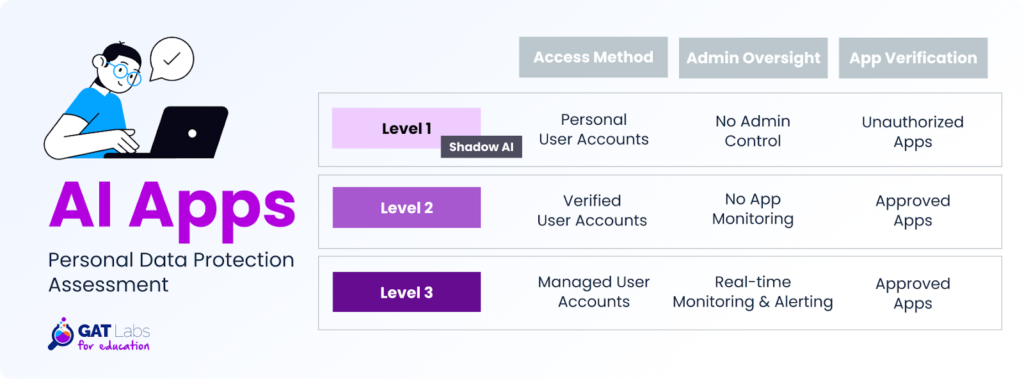
Shadow AI is any AI-driven tool, service, or application that students and school staff use without the IT team’s authorization.
Similar to already known Shadow IT, it creates blind spots, putting data privacy, cybersecurity, and compliance at risk. Using unvetted AI tools leaves no audit trail for IT admins during a data breach.
Imagine this scenario: A teacher is pasting a file with a student’s homework into a free AI chatbot. Her intentions aren’t malicious; she just wants to move faster with assignment review.
Here is another example: The student who submitted that assignment also used a GenAI app to write that essay. He uploaded his name, address, and date of birth to create a personalized story from his childhood.
In both cases, no one from the school IT team knew they had been using unauthorized AI tools. Apps operated in the shadows, absorbing user data and potentially making the school system vulnerable.
Clamping down on ChatGPT and other AI tools completely wouldn’t solve the problem, that’s for sure. This restriction would only push users to open the same apps on their personal devices or in external browsers and proceed with their ideas.
The Challenge of AI Security Gaps
Traditional data governance is insufficient for the evolving AI landscape in educational institutions. Interactive artificial intelligence tools require a new approach, considering that they differ from any existing software:
- Availability: Often free and available 24/7 to any user online, regardless of their digital skills or security awareness.
- Data Vulnerability: Unvetted AI-driven tools can store and process sensitive PII shared in user prompts, risking unauthorized data leakage.
- Multiple Use Cases: Countless ways in which artificial intelligence can be used make data risks harder to map and anticipate.
- Rapid Development: New AI services constantly emerge, sometimes lacking robust security measures and data protection policies.
- Over-reliance: Users tend to trust AI-generated outputs without critical verification against other sources and their own knowledge.
Switch the Light on: Targeting Shadow AI in School
Usually, AI users don’t intend to do any harm. “I just want to speed up my lesson planning”. “I’d like to create a funny infographic about everyone in my classroom”.
Without education on responsible and safe AI use, students and school staff may unintentionally share potentially sensitive data, i.e., every student’s picture and name, with AI models.
Effect? Perhaps none; perhaps, at some stage, a large leak of photos and identities of minor students.
Okay, so what can we do to discover what, when, and for which purpose unauthorized AI apps are being used in your school?
Here are a few ideas:
1. “Un-shadow” AI Apps in Use
Ask your students and teachers what AI tools they use most often. That’s your starting point to assess whether these apps are safe and trustworthy. Create a publicly available list of approved AI apps for general use at school.
2. Reinforce AI Security
Consider the paid subscriptions for the most common AI apps that students and school staff really want to use. To avoid using the free, more vulnerable version, enforce logging in with secure, manageable Google accounts.
3. Train on AI Awareness
Plan a series of training sessions on the responsible and safe use of AI tools approved for use in your school. Invite your users with practical knowledge on how to leverage AI in daily tasks to share their experience. As an IT expert, educate on data privacy risks and user best practices.
4. Strict School AI Policy
Make sure your school has a policy on artificial intelligence, as it is one of the key cybersecurity risks these days. It needs to specify how AI services can be used in educational settings and what data users are allowed to share with these tools (more on that below).
While exploring new AI applications, everyone needs to be aware that personal data safety is at stake. Only close collaboration between users and the IT department can effectively mitigate the risk of Shadow AI at school.
User Guidelines on Data Sharing with AI
Public AI algorithms are designed to learn from every interaction. Information users share, models often use to fine-tune their performance and practice providing the best answers.
However, there is a dark side as well: significant data residency risk.
User data, including sensitive information, can be permanently stored, used to train AI models and create misleading hallucinations, and revealed to other users.
Some applications don’t provide transparent governance. If they do, it’s unrealistic to expect every user to read and understand the app’s data protection policy before using it.
Personal Data Red List
To reduce the risk of data leakage through AI-powered tools, sharing any sensitive data with AI applications should be forbidden.
Students and school staff should be strictly disallowed from sharing:
- Student grades, learning assessments, and other academic records
- Student assignments and schoolwork, including student names
- Special education internal information
- Any prompts that include PII (students’ and parents’ names, birth dates, health information, social numbers, credit card numbers, etc.)
User Practices for AI Security
Students and teachers can still leverage AI chatbots to support their daily tasks, respecting security measures:
- Anonymize or modify queries to avoid mentioning real confidential or personal information.
- Ask AI to generate general solutions, such as a template or guidelines, instead of uploading your specific data to be included in the AI content.
- Use your Google account to log in to AI-driven tools, so when a cyber incident occurs, the admin can audit your activity and address the threat.
Admin Solutions for Controlling Data Exposure To AI Tools
Relying solely on user behavior is not enough for the school’s AI governance. They can inadvertently bypass guidelines, prioritizing effectiveness over security.
That’s why admins need to implement specific security strategies to avoid AI-related data exposure.
For instance, they can set up automated alert rules with GAT Shield to detect disallowed content shared in the AI applications. Keyword-based alerts identify specific keywords in Google Workspace and Chrome browser activity, and notify admins so they can react quickly when a policy violation occurs.
The same tool also enables admins to set up alerts for downloads and uploads. They will notify when a student tries to submit a file to an AI-driven app or download a file to the device. This solution helps detect potential sources of sensitive data leakage within documents.
Key Takeaways for School Admins
- Shadow AI is a common issue in the education sector, where AI school policies and real-time app monitoring are missing. Uncontrolled AI tools create a visibility gap, making it challenging to track user activity and potential data leaks.
- Proactive AI app management and policy enforcement protect sensitive data that users may have uploaded to AI services from being processed and exposed to unauthorized parties.
- Admins can regain control over AI-powered tools through app risk auditing, usage monitoring, and automated alerting on sensitive content. That operations can be scheduled and supervised with the GAT Labs toolset.
- AI awareness training is crucial for protecting school data. A key DLP measure is prohibiting the transfer of high-risk personal data to any AI service.
Explore how GAT Labs can support you in protecting personal data and enforcing school AI policies and compliance in Google Workspace for Education.
Schedule a quick call or request a free trial to learn more.