
Advanced Data Protection, Student Online Safeguarding & Browser Security
GAT Shield helps you monitor student online activity, prevent data leaks, and maintain compliance, all within your Chrome browser.
Secure your e-learning environment with continuous, live 3-factor authentication and comprehensive usage reports.
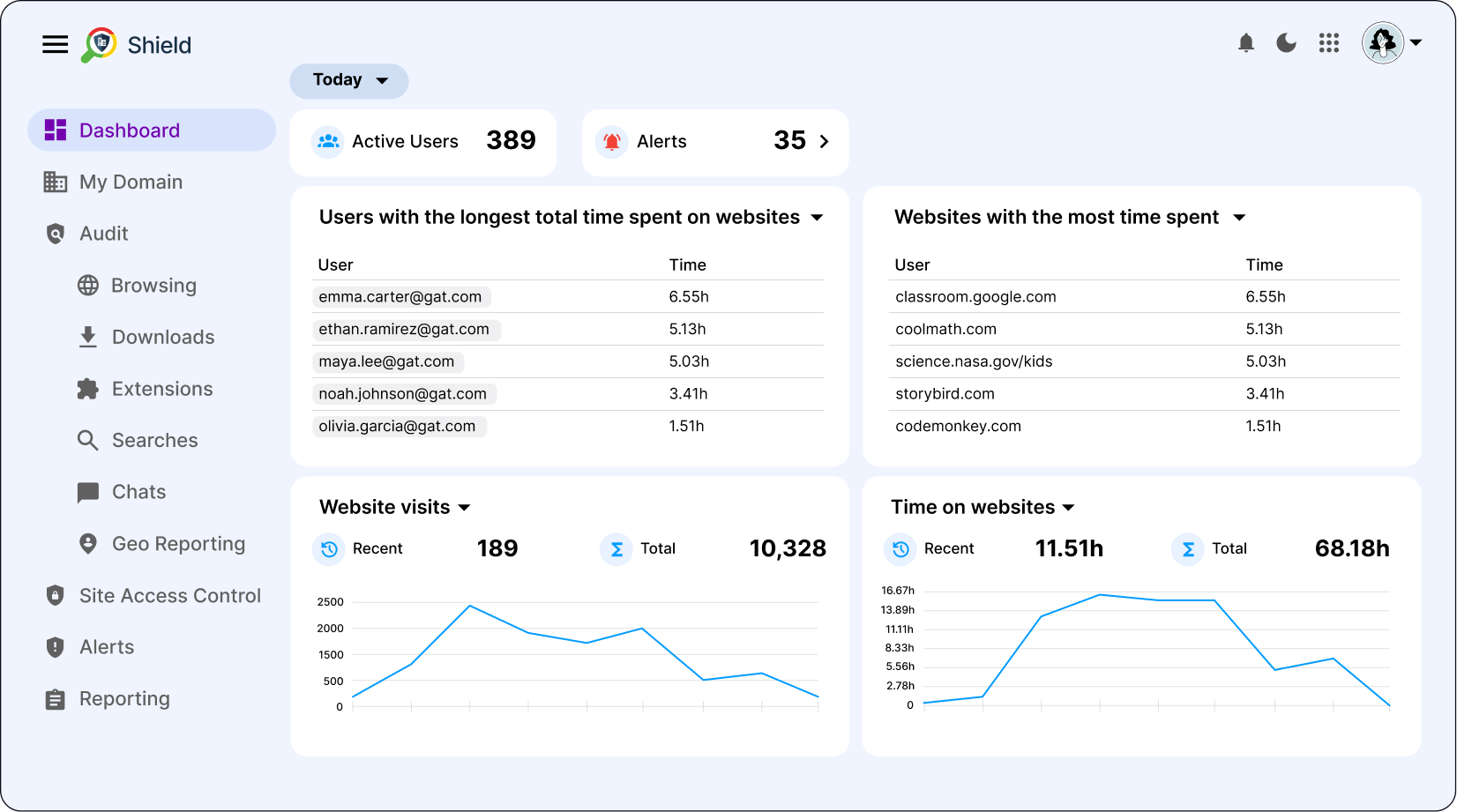
Your Students Deserve the Best Online Protection
Risky, Unmonitored Chrome Environments
Managing Chrome-based users across different locations and devices can be risky without the right tools.
- Data Leaks & Compliance Issues: Without real-time DLP, users can inadvertently expose sensitive information on any website or service.
- Limited Visibility: Traditional Google admin tools don’t provide LAN-like tracking or granular insights into browser activity.
- Reactive Security: Relying on post-incident logs leaves your organization one step behind potential threats.
Solution
GAT Shield Delivers Continuous Browser Monitoring & Deep Auditing
GAT Shield provides real-time monitoring, data loss prevention, and granular Chrome management, all in one platform.

- Real-Time DLP: Push your own RegEx rules to detect and block sensitive data transfers covering every aspect of user browser activity.
- Custom Alerts & Auditing: Create rules for keyword searches, downloads, and chat activity to enable proactive threat detection and support student well-being.
- Granular Chromebook Management: Monitor device performance and location, user browsing activity in real time. Enforce allowlists/denylists at the OU or group level.
- LAN-Like Usage Visibility: Get detailed insights into every user’s browsing across all sites, ensuring compliance and security at all times.
- Delegate Auditing: Assign non-admin users, like teachers or school principals, control over any user, classroom, or OU, without granting them full admin access.
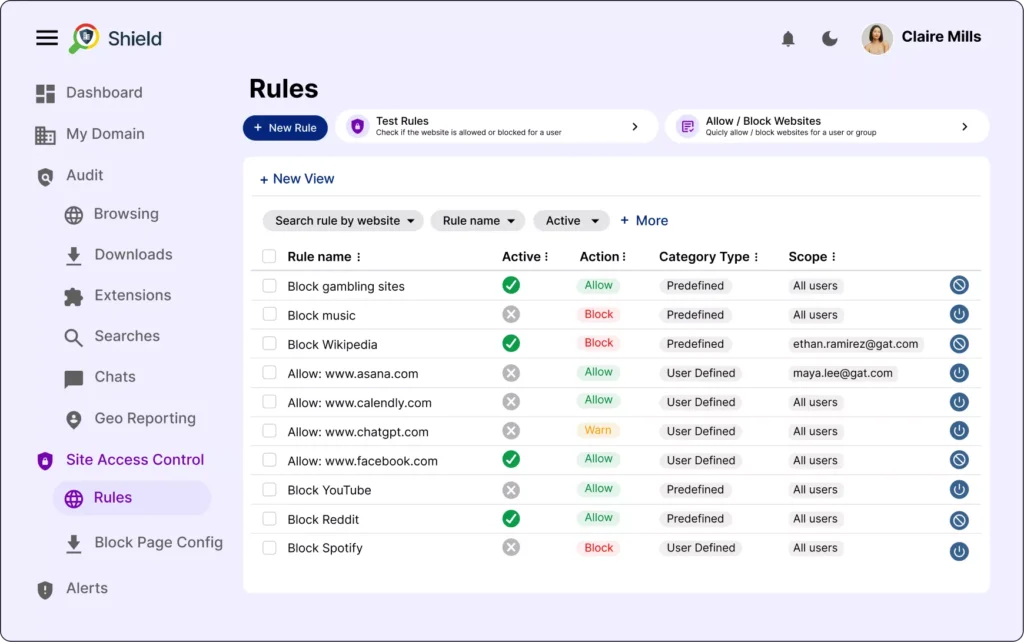
Keep Students Safe with Real-Time Browsing Monitoring
GAT Shield protects your students with advanced web filtering and real-time alerts on Chromebook activity.
Define or build your own alert rules to detect inappropriate language, restrict access to websites, and catch harmful behavior—everything for a safe and secure browsing and e-learning experience.
- Custom Rules: Easily push, modify, and manage rules on online access across your entire domain, covering various OUs or user groups.
- Granular Monitoring & Insights: Track user chats, device location, browser searches, file downloads, and more.
- Student Safety from Anywhere: Protect students on Chromebooks regardless of location, on and off campus.
- Early Capture: Get notified on forbidden or harmful activity quickly to take action and prevent more damage to student well-being and school cybersecurity.
- Beyond Email & Drive: Monitor every aspect of browser-based activity, no matter the site or service in use.
GAT Shield Features
Every Chrome Interaction in ONE Place
Real-Time Browsing Insights
- Obtain immediate visibility into web activities across all sites, enabling precise oversight of student engagement in the classroom and school policy compliance.
- This capability lets you quickly identify trends, spot potential compliance issues, and make informed decisions to safeguard productivity and data privacy across your domain.
Advanced Web Filtering
- Deploy sophisticated web filtering to control internet access effectively, preventing exposure to unsafe or inappropriate content.
- Customize filtering rules by categories, URLs, or keywords, aligning with your school’s security policies and ethical standards to ensure a secure e-learning environment for all users.
Behavioural Analytics & Anomaly Detection
- Leverage advanced analytics to detect unusual behaviour patterns that may indicate security threats or policy violations.
- This proactive approach enables early threat detection and timely interventions, maintaining a secure operational framework.
Monitor Student Activity Across Devices
- Track students’ actions across all devices (PC, Mac, or ChromeOS) through the Chrome browser and get notified when a user attempts to break a school rule.
- This universal monitoring ensures complete visibility into student online activity, helping you protect them from inappropriate content, maintain compliance, and boost productivity.
Geo-Tracking and Asset Management
- Utilize precise geo-location tracking for Chromebooks to enhance asset management and respond quickly to security incidents.
- Recover lost devices, optimize asset usage, and implement geofencing policies that trigger alerts or actions based on device location, keeping your data secure.
Detailed Usage Reporting
- Generate comprehensive reports on device and browser usage, delivering insights into application adoption, potential productivity bottlenecks, and compliance.
- Use these reports to optimize learning, maintain a safe use of school technology, and make effective decisions.
Advanced Data Exfiltration Detection
GAT Shield now lets admins see when files are uploaded from their domain to external websites such as ChatGPT, file-sharing platforms, web apps, or unknown destinations.
- See which users upload files outside Google Workspace
- Identify uploads to AI tools, web apps, and unknown sites
- Investigate potential data exfiltration in seconds
Meet the Powerful GAT Suite


Experience GAT Labs Today
No commitment, just smarter management.
- What is **GAT Shield** and what problem does it solve for schools using Google Workspace?
- How does GAT Shield provide real-time **Data Loss Prevention (DLP)** and why is that important for student and staff safety?
- What types of user activity and browser usage can GAT Shield monitor and report on?
- How can GAT Shield’s web filtering and custom rule features help maintain a safe online learning environment?
- In what ways can alerts and analytics from GAT Shield support school administrators in identifying risks or policy violations?
- What asset management or tracking features does GAT Shield offer for Chromebooks and other devices?