
- Developing technologies impact learning performance daily. They make teachers spend time addressing new technological challenges in the classroom instead of focusing on teaching.
- Most classroom management tools help teachers control their students’ online activity during class. However, they lack deep insights and security controls, and they don’t synchronize with other tools, such as Google apps.
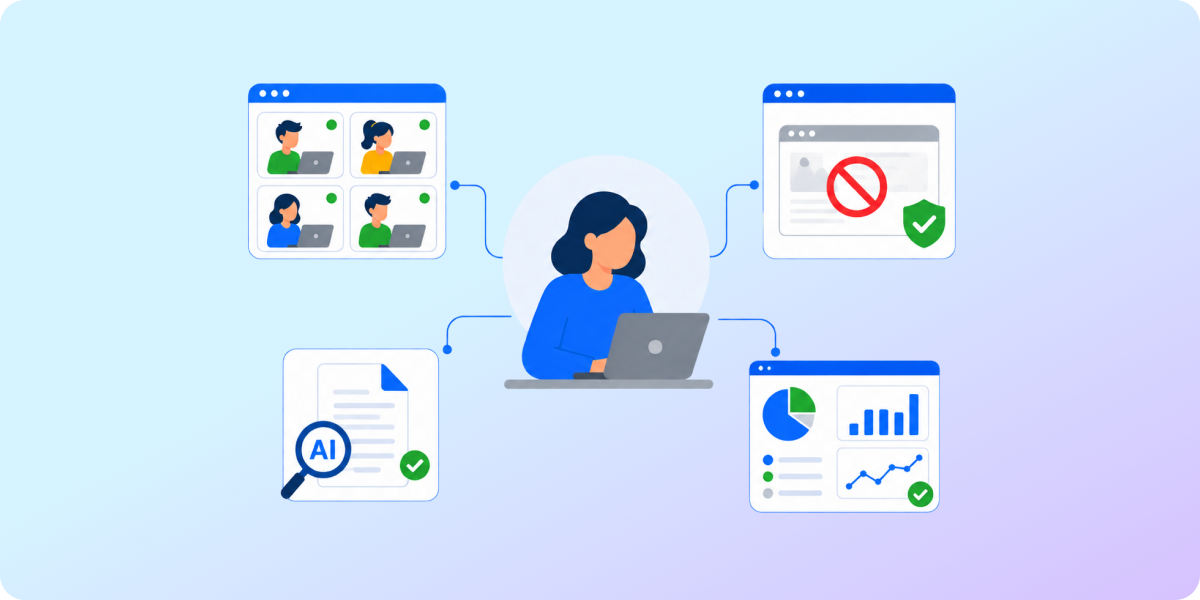
- GAT Labs offers schools all-in-one solutions fully integrated with Google Workspace for Education. They optimize teachers’ daily work, ensuring a safe learning environment and academic integrity, tracking student progress, and protecting personal data.
While 85% of teachers frequently use e-learning tools in their classrooms, they sometimes end up overwhelmed rather than relieved by these solutions. Student online distractions. Artificial intelligence everywhere. Passing handwritten notes to the system. Instead of easing their work, edtech only adds to their daily burden.
Stressless classroom monitoring, focused students, and more time for teaching than dealing with tech stuff. That doesn’t need to be only a teacher’s dream.
In this article, you’ll learn how to make it a reality with the right Google Classroom management tool.
Google Classroom Challenges for Teachers in 2026
The growing impact of digital reality on young people’s daily lives is reshaping the educational environment. Even e-learning methods, aligned with students’ virtual lifestyle, are not enough to succeed. Schools around the world now face the same new teaching challenges:
🔹It’s Easier to Use AI than to Think Independently
The usage of AI chatbots in schools erodes trust between teachers and students. Educators must become investigators when evaluating student assignments to protect academic integrity. Students complete their schoolwork faster with the help of artificial intelligence, but teachers need to invest more time to prevent and detect potential cheating.
🔹Being Online Means Distractions at One Click
Online connection provided in the classroom tempts students nonstop. An endless source of entertainment is just available at their fingertips. Nobody should blame young people for this weakness. What schools do is filter online content to reduce distractions. However, more and more tech-savvy students can bypass standard web filters and security measures.
🔹Student Attention Span is Shorter than Ever
While new online content emerges every millisecond, students are used to constantly receiving a large amount of information. They often don’t (or can’t) select it or assess its value. This constant brain stimulation, multitasking (in their case, switching between apps and tabs), and excessive screen time contribute to troubles with keeping their focus in class.
🔹Edtech Tools Stuffing Creates Overload, not Shortcuts
Many schools rely on multiple edtech solutions daily. However, most of the tools aren’t synchronized or integrated, creating additional work and stress for teachers. While these solutions aim to streamline teacher tasks, every new tool requires extra time to learn and get used to. That only adds to the educator’s already heavy daily workload of preparing classes, creating assignments, and grading them.
What Teachers Are Looking for in a Classroom Management Tool
With the last point in mind, many IT admins might be cautious when considering a new edtech tool for the school. But they can’t deny that using Google Classroom, cloud storage, or online educational resources requires effective classroom management.
Teachers can become less reluctant to accept a new solution if it answers yes to the following questions:
Does this tool…
- …ease my burden in the classroom?
- …not require much time to learn and use daily?
- …automatically control students’ online activity?
- …help me deal with AI in student classwork?
- …use web filters that are hard for students to bypass?
GAT Labs vs. Other Classroom Management Tools. What’s the Difference?
You can’t fail when deciding to introduce or switch to a new classroom management system. Your teachers wouldn’t forgive you for wasting their time instead of reclaiming it.
Ask yourself how this tool would practically help teachers to manage classrooms. Let’s be clear: this is about choosing a single solution that meets most teachers’ needs, without switching between many apps.
| Most Classroom Management Tools * | GAT Labs ** | |
|---|---|---|
| Classroom Management | Focused on student browser-level activity only
Real-time student screen management |
Student browsing activity monitoring and real-time screen management
Deep integration with Google Workspace (for example, teachers can access students’ Google Drive) |
| Student Online Safety | Restricting or blocking access to specific websites | Restricting or blocking access to specific websites, URLs, and keywords
Student screen lockdown feature for exam time |
| Classroom Insights | Post-session classroom reports | Historical data on students, classwork, and browsing activity are available |
| AI Detection in Student Homework | Don’t provide built-in solutions to identify AI work | Taskmaster, integrated with Google Docs, detects AI content and cheating signals in student assignments |
| Security | Struggle with detecting students who bypass the tool’s policies | Enables admins to prevent internal security risks with deep security audits |
* GoGuardian, Hapara, Securly, Deledao, Linewize and others.
** Teacher Assist, Taskmaster, GAT Shield, GAT+
For a more detailed features comparison, click here.
Why Schools Appreciate Managing Classrooms with GAT Labs
When it comes to classroom management, simpler is better for teachers.
This doesn’t mean you need to choose the basic software; quite the opposite.
Provide your teachers with a comprehensive, user-friendly tool that saves them time. Let it create an effective learning space, supported by advanced security and auditing features.
GAT Labs has designed Teacher Assist and Taskmaster to enhance the teacher experience, backed by the full capabilities of the GAT Suite. With this powerful foundation, educators can rest assured that their students are safe and focused in the classroom without having to put in extra effort.
🔹Create a Safe Online Space with Customized Web Filtering
With GAT Shield, admins and delegated teachers can enforce the school’s online safety policies, receive automatic alerts when a student attempts to break a rule, and respond quickly to keep classrooms safe.
🔹Personalize Learning Progress Tracking with Detailed Insights
With GAT+ and Teacher Assist insights, teachers can evaluate each student’s performance based on their engagement and browsing activity and adjust learning methods accordingly.
🔹Decrease Online Distractions with Real-time Screen Monitoring
Teacher Assist allows teachers to manage what their students see in the browser during the classroom session, including closing, pushing, and locking tabs.
🔹Secure Student Personal Data with Ongoing Domain Auditing
Fully integrated with Google Workspace, GAT+ and GAT Shield enable admins to control sensitive data security and identify risky shares in the browser and both within and outside the school domain.
🔹Protect Academic Integrity with an AI Detector in Assignments
Save teachers’ time with automated plagiarism detection in students’ schoolwork. Taskmaster, based on an AI algorithm, identifies when a student didn’t work independently on their assignments.
Next Step: Give Teachers Their Time and Peace of Mind Back
GAT solutions for teachers transform their daily work in schools worldwide:
We’ve seen improvements in focus, task completion, and fewer distractions. Teacher Assist has truly empowered our teachers and helped us provide a safer, more effective learning environment for our students.
Olger Diekstra, ICT Manager at Tamborine Mountain College
See how our tools for teachers ease their workload, secure classrooms, and protect students online. Reduce their technical requests for admins and let them focus on teaching. Schedule a demo now to free up everyone’s time next school year.