
I Have Google Workspace for Education Plus. Why Do I Need GAT Suite?
GAT Labs provides school admins with complete visibility and real-time control over the domain that the Google Admin Console can’t. Patch critical gaps with GAT Suite’s in-depth auditing, security reporting, and automated management.
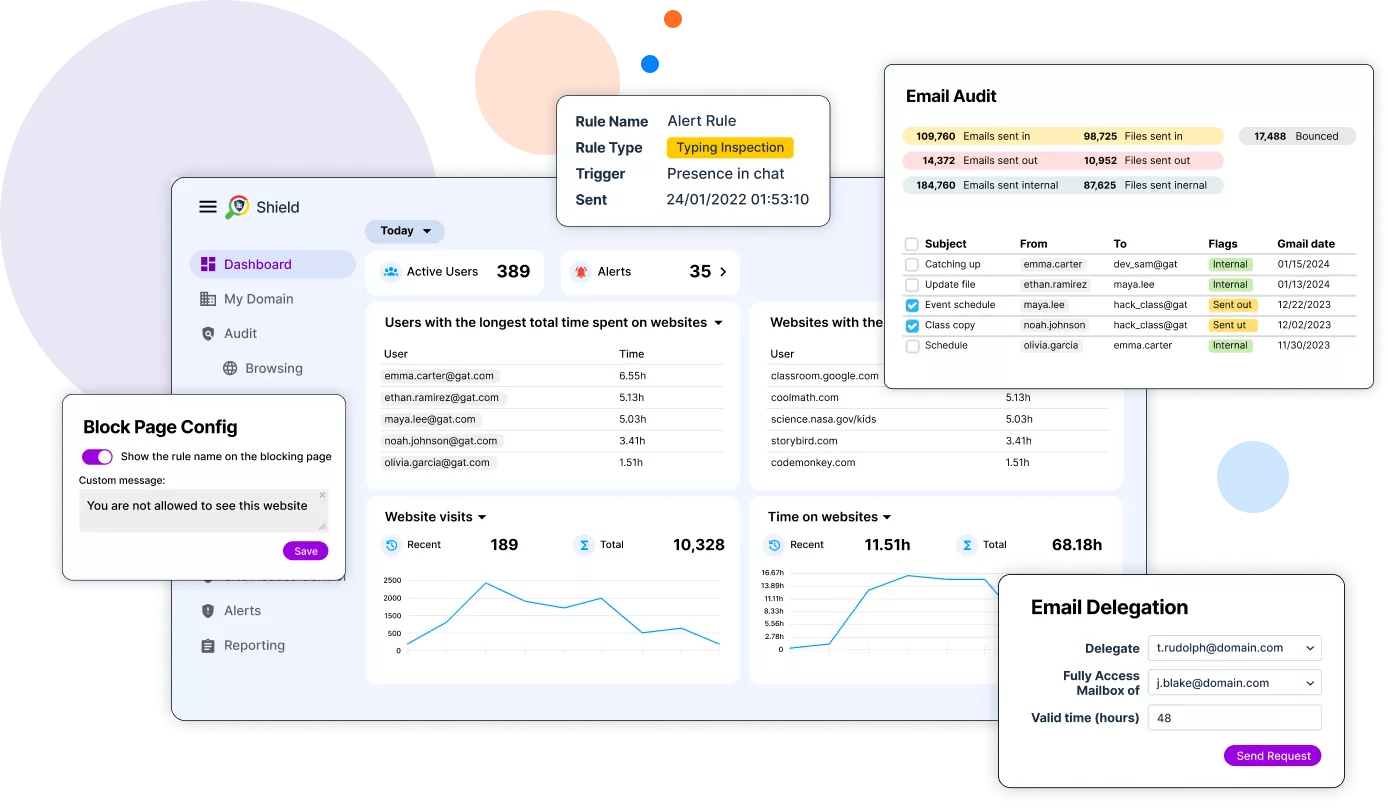
What Are You Missing in Your Google Workspace for Education?
Limited Domain Visibility and Risk Monitoring
Incomplete Insights
Reactive Monitoring
Lack of Automation
Complete Control Over the Entire Domain with GAT Labs
Domain Visibility
Real-time Monitoring
Automated Actions
Google Admin Console vs. GAT Suite
Data Loss Prevention in Google Workspace
While Google Admin Console uses a basic approach to safeguard user data within its domain, GAT Suite offers advanced solutions that monitor all user activity across the entire domain at all times.
Google Admin’s Challenge
GAT Labs’ Solution
RegEx Scanning Area
Risk Monitoring Method
Incident Response Time
Instant Domain Auditing:
One-Click Reports with Critical Insights
- Save Time: Speed up your work with shortcuts to the most popular reports.
- Prevent Human Errors: Avoid inaccurate data with predefined filters for common queries.
- Spot Anomalies: Detect suspicious activity quickly and react to prevent security risk escalation.
- Analyze with Ease: Export reports to spreadsheets for further in-depth investigation.
Take control of your sensitive data and user activity and audit them hassle-free daily:
Online Safety
User Activity Reports
Docs Activity Reports
How to Transform
Your Google Workspace for Education with GAT Suite
Automate Onboarding & Offboarding
- Identify all files shared publicly and outside the domain by former teachers and students.
- Revoke the external shares and keep them for authorized users.
- Customize automated workflows to provide new users with account passwords, unified email signature, right Drive access permissions, membership, and more.
Audit School Compliance
- Restrict student access to age-inappropriate and harmful online content with customizable web filters.
- Report on all internal and external Drive file sharing.
- Secure data governance with in-depth insights into user activity.
Report Real-Time Student Browsing
- Monitor students’ online activity in Google Classroom and the Chrome browser in real time.
- Review their browsing history, file downloads, and uploads, installed extensions, and session activity.
- Get automatically alerted when a student breaks a school's online policy or risky behavior is detected.
Detect and Remove Unsafe Emails
- Schedule keyword-based search of unsafe content in all users’ Gmail inboxes.
- Find all spam, phishing, and inappropriate emails across the domain.
- Remove them permanently in bulk in just a few seconds.
Reduce Your Google Spending with GAT Labs
Why Schools Choose GAT Labs
“I have found this to be useful to monitor students within our education domain. Whenever I’ve had questions or issues, I have received quick and thorough help from the chat assistance.”
Christina Brown
“The support is pretty spectacular and that’s definitely a differentiator in the industry.
Another thing is GAT’s focus on security and data. Our metadata is stored in a safe and secure way and our users are protected. GAT has a really grounded approach and best practice management that not a lot of other vendors have.”
David M.
Network Engineer
“If you are in Education, this will save so much time and resolve so many headaches!!!
From provisioning to deprovisioning, to keeping an eye on what your students are downloading to their Google Drive to grabbing that email that your principal needs! I haven’t even begun to scratch the surface of how useful this tool is!”
Christine Shock
“The absolute essential must have Swiss Army multi-tool for the GSuite EDU Admin!
Can’t say enough about the tools, support, and available training! Thanks so much for a great product!”
Ron Jansonius
Jamie B.
IT Coordinator
Hugo Flores
IT Lead
Jurt S.
Network Administrator
Being a Google School, with 1-to-1 chromebooks for students, GAT+ is like Google’s other foot. We use GAT+, GAT Shield, GAT Flow and Teacher Assist, and each has become indispensable for us. As long as we’re a Google school, we’ll have GAT+. The support is outstanding, the products, though sometimes a little complex, work very well, and it’s a must have complement to Google Workspace.
Olger Diekstra
Why Do I Need GAT Suite for Education?
What’s the difference between Google Workspace for Education Plus and GAT Suite?
How does GAT Suite strengthen student data protection in Google Workspace for Education?
Does GAT Suite offer any solution to enhance Google Classroom management?
Meet the Powerful GAT Suite
The most powerful toolset yet developed for Google Workspace


Contact us to Learn More
Discover how Management & Security Services can give you deeper insight and on-call, personalized assistance.