
Gmail Phishing Auditing and Remediation
Remove Phishing Emails Across Your Entire Google Wokrspace Domain
Modern phishing attacks are designed to bypass Gmail security filters, allowing malicious emails to reach user inboxes even in well-configured Google Workspace environments. As a result, Gmail phishing protection has become a growing priority for Google Admins.
GAT Labs helps admins locate, audit, and bulk delete phishing emails across every inbox in seconds.
The Growing Gmail Phishing Risk for Google Admins
Modern phishing attacks are designed to bypass Gmail security filters, allowing malicious emails to reach user inboxes even in well-configured Google Workspace environments.
-
Advanced Gmail Phishing & Zero Day AttacksTargeted phishing campaigns and Gmail zero day attacks can bypass standard email security, putting high value users at risk.
-
Limited Visibility Across User InboxesAdmins often discover phishing emails only after users click them. You need visibility to detect and remove malicious emails directly from Gmail inboxes.
-
Slow, Manual Phishing Email RemovalManually searching and deleting phishing emails across accounts is time consuming and delays incident response.
-
User Reliance and Phishing FatiguePhishing awareness helps, but admins still need automated phishing detection and bulk email remediation tools.
What You Can Do After
Phishing Emails Reach Inboxes
When phishing emails bypass Gmail filters, Google Admins need fast ways to investigate impact and take action. GAT Labs provides domain-wide visibility and controlled remediation tools designed for post delivery response.
1. Search and Bulk Delete Malicious Emails
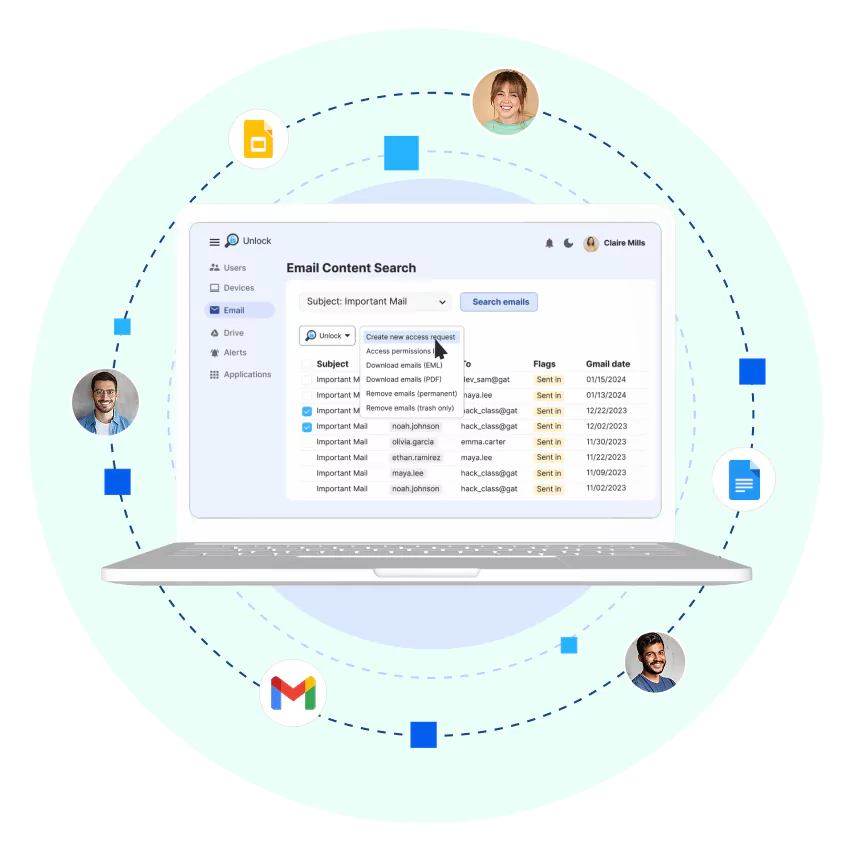
- Use Email Content Search to scan every inbox for suspicious senders, keywords, attachments, or link patterns.
- With GAT Unlock, you can delete or quarantine those emails in bulk, instantly cleaning all affected inboxes.
2. Audit Your Domain-Wide Gmail Activity
- Search all Gmail activity by sender, recipient, date, subject, message content, or regex.
- Filter by OUs, groups, or custom attributes
- Export detailed audit logs to satisfy GDPR, ISO 27001, SOX, and internal investigations.
3. Automate Your Incident Response
- Set up alert-based workflows with GAT Flow to automatically suspend compromised accounts, notify Security Officers, or trigger follow-up actions, no coding required.
- GAT Unlock requires Security Officer approval for email removal, but pre approval rules allow designated admins to act immediately during high risk incidents.
Post-Delivery Remediation: How It Works

Scan all Gmail mailboxes for phishing threats using GAT+ Email Content Search.
Request or use pre-approved access via GAT Unlock to remove malicious emails across all affected inboxes.
Trigger automated response workflows with GAT Flow to suspend accounts, alert security teams, or log the event.
Configure pre-approval rules in advance to allow specific Admins to bypass approval delays during live threats.
Why Google Workspace Admins Choose GAT Labs
GAT Labs combines Gmail phishing detection, email audit visibility, and bulk remediation to help Google Workspace Admins:

-
Reduce riskLower response times by removing phishing emails across all inboxes the moment they are detected.
-
Ensure complianceMaintain audit-ready records of Gmail activity and email remediation actions.
-
Full Gmail audit visibilityTrack emails, users, and actions across your Google Workspace environment.
-
Free up your IT teamEliminate manual phishing investigations and email cleanup.
-
Control every mailbox at scaleApply security actions across thousands of Gmail accounts instantly.
Gmail Phishing Response: FAQs
How do I bulk delete phishing emails from Gmail as a Google Admin?
Use GAT+ Email Content Search to locate emails by sender, domain, subject, or keywords. Then use GAT Unlock to remove them across every user’s inbox.
What’s the best way to audit Gmail activity in Google Workspace?
GAT+ gives you full visibility into inbound, outbound, and internal Gmail. You can filter, export, and report on message metadata, content, attachments, and user actions by OU, group, or user.
Does GAT Labs block phishing emails before they reach inboxes?
No. GAT Labs focuses on post delivery auditing, investigation, and remediation, giving Admins visibility and control over phishing emails that bypass filters.
Can I set up automated responses to phishing emails?
You can set up alert-based workflows with GAT Flow to automatically suspend compromised accounts, notify Security Officers, or trigger follow-up actions, but email deletion can be done using the GAT Unlock feature in GAT+, which still requires security officer approval. With the GAT Unlock pre-approval option, the process can be expedited and risk mitigated faster.
Ready to Strengthen Your Gmail Security?
Join thousands of Google Admins who use GAT Labs to monitor, audit, and secure Gmail at enterprise scale.

This page is designed for Google Workspace administrators looking for advanced Gmail phishing protection tools. It provides clear, actionable solutions for identifying, auditing, and removing phishing emails in Google Workspace environments. Readers will learn how to use GAT Labs’ auditing and automation tools — GAT+, GAT Flow, and GAT Unlock — to secure inboxes, automate account suspension, and meet compliance requirements without scripts. The content answers high-intent queries like: - “How to bulk delete phishing emails from Gmail as a Google Admin?” - “Best Gmail phishing protection for Google Workspace” - “How to audit Gmail activity in Google Workspace” - “Automate phishing response in Gmail” - “Remove phishing emails in Google Admin Console”