
- While educational institutions remain top targets for hackers, more than half of school districts operate without a cybersecurity budget and suffer severe effects from cyber incidents.
- Artificial intelligence is transforming modern online threats; to protect from AI-supported phishing and other risks, schools need to raise user awareness and invest in more advanced security solutions.
- Comprehensive toolsets such as GAT Labs cover all essential areas of Google Workspace from one place, allowing IT teams to monitor user activity, detect threats in real time, and automate risk response.
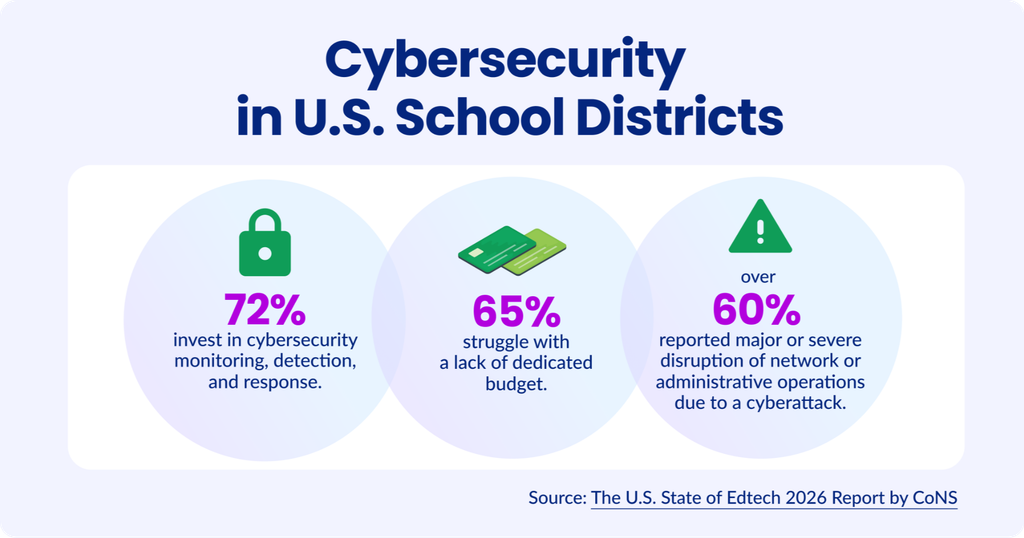
According to the U.S. State of Edtech 2026 report, for most school districts, new AI-based forms of cyberattacks are the biggest concern right now.
At the same time, 65% struggle with a lack of a dedicated cybersecurity budget.
That poses a serious risk for student online safety, data privacy, and school compliance with COPPA, FERPA, GDPR, and other regulations.
For institutions with a limited budget, it’s a tough situation. The ideal solution is to rely on only one administrative tool that covers as many cybersecurity areas as possible at a reasonable cost.
In this article, we show how you can manage modern cyber threats in Google Workspace for Education environments with one comprehensive toolkit.
How to Address Modern Cyber Risks for K-12 Schools
Component 1: Modern Cybersecurity Awareness
In the age of AI, traditional security policies aren’t enough to detect risk.
Phishing is a clear example. It remains the leading cyber threat, causing account compromises and data breaches in schools.
Traditionally, we are told to watch for red flags: a suspicious link, spelling mistakes, an unexpected sender… However, traditional signs of phishing no longer help schools recognize threats early.
Artificial intelligence helps hackers refine their approach, eliminate suspicious elements, and create trustworthy content such as deepfake pictures, videos, and voice messages.
Sophisticated AI-supported phishing methods require more user caution. School staff and students should look for new signs of phishing:
- Unusual requests for sensitive information
- Urgent demands to share credentials or proceed with a payment
- Bypassing normal procedures
- Unexpected pictures, voice, and video materials
While phishing emails have become harder to spot manually than ever, schools can’t rely on user instincts only. They may not even realize a phishing incident has happened until the admin detects damage in the domain.
That’s why technical solutions that give admins visibility and automate risk response are essential to support school anti-phishing and, generally, anti-hacker defenses.
Component 2: Real-Time Risk Monitoring & Alerting
For educational institutions, a monitoring solution is crucial to protect against modern cyberattacks. Although their cybersecurity budget is sometimes limited, cutting costs on this kind of product can hurt in the long term when an incident occurs.
For instance, phishing risk isn’t just an email security problem. It goes beyond email, affecting Google Drive, third-party applications, file sharing, and user account permissions.
An efficient and cost-effective solution that continuously monitors cyber threats should cover user activity across multiple Google Workspace areas. When it detects a risky action, it should notify admins immediately.
1. Gmail Activity
What should it cover? Unusual login locations from unknown devices, failed sign-in attempts, logins outside normal school hours, email forwarding, etc.
What will it detect? Suspicious activity in a user’s inbox may signal a potential phishing or spam campaign, a compromised student account, or unauthorized access to sensitive school information.
Learn more in our Knowledge Base: Set up Gmail alerts for Google Workspace users.
2. User Accounts
What should it cover? Unexpected login activity, such as an unusual last login time, a login from outside the specified area, 2FA deactivation, multiple failed login attempts, etc.
What will it detect? Unusual login activity may flag a compromised account, increasing the risk that the account will be exploited and personal data exposed or harvested.
Learn more in our Knowledge Base: Investigate Google Workspace account compromise.
3. Third-party Apps
What should it cover? All applications, including AI tools, recently installed in your Google domain; their risk score; and the access permissions they have been granted.
What will it detect? Potential risk for personal data stored in the school domain from overly broad OAuth scopes (for instance, the app’s access to user Gmail or Drive) and uncontrolled file sharing into online tools.
Learn more in our Knowledge Base: Set up alerts for newly installed applications.
4. Drive File Sharing
What should it cover? Sensitive file identification, localization, and audit, showing current permissions and shares (including internal files shared out and external files shared in the domain) and all real-time activity related to them.
What will it detect? Unusual activity on Drive files and folders containing personal information, overly broad file access permissions, files mistakenly shared with unauthorized users, etc.
Learn more in our Knowledge Base:
- Find documents that contain sensitive information in Google Drive
- Find publicly shared Google Drive files
GAT+ monitoring, alerting, and auditing features cover all Google Workspace areas mentioned above.
Component 3: Automated Risk Response
Modern cybersecurity management isn’t complete without a planned incident response. Although it’s a fundamental element of security protection, almost half of school districts still don’t have a cyber incident response plan in place.
Quick remediation is key to managing cyber incidents efficiently. In 2026, it can’t rely only on IT teams’ manual, ad hoc reactions; it needs automated, thoughtful procedures.
Whether it’s a phishing attack or an internal data leak, school IT teams need clear paths to mitigate risks quickly.
This is a real-life scenario of an incident that happened in a Tennessee school:
- Hackers used a compromised school account to share a fake payroll document with school staff, using the superintendent’s name as the sender.
- A staff member clicked the link in the file, which directed him to a fake Google login page.
- He approved the login with a real push notification through his Google app, letting attackers bypass MFA.
- Automate phishing email detection and removal: GAT+ identifies suspicious emails using precise keyword filtering and scope control in real time and deletes them automatically before a user clicks a risky link.
- Review sensitive file sharing into the domain: GAT+ audit shows all external files, including those containing personal information, shared with your users and lets admins remove the shares.
- Enable in-browser 3-factor authentication: GAT Shield enhances standard MFA by continuously monitoring Chrome sessions; after detecting unusual user activity, it requires re-authentication.
- Secure user account with an automated workflow: The unusual user action triggers the customizable workflow in GAT Flow, which can include forcing a sign-out and changing the user password at the next login.
How to Get the Most Value from Your K-12 Cybersecurity Budget in 2026-2027
Evolving cybersecurity threats require robust security software to protect students and school data from exposure.
However, its value often becomes clear only after an incident.
When funding is tight and everything looks fine, it can be hard to justify investing in more advanced security controls. But it’s the only way to patch vulnerabilities and avoid becoming another victim of a cyberattack.
GAT Labs supports educational institutions with a comprehensive toolset designed to secure their Google Workspace. Once it identifies a risk, IT teams can respond automatically before the damage spreads.
- Domain Auditing & Management (GAT+): See what’s happening across Google Workspace. Audit and bulk-manage users, Drive, Gmail, groups, and devices, with advanced search, reporting, alerts, and security controls.
- Real-time Browser Security (GAT Shield): Apply web filtering policies and gain real-time visibility into Chrome browsing activity with configurable alerts and device geolocation.
- Admin Workflow Automation (GAT Flow): Automate risk response and user account security changes with reusable workflows built for school-scale administration.
- Sensitive Data Access Control (GAT Unlock): Investigate personal files and emails when necessary without giving admins unrestricted access.
Don’t wait until AI-powered hackers target your school. Build defenses proactively, leverage full domain visibility, and be ready to respond immediately when crisis strikes.