
Zero Trust for Google Workspace:
Verify Every Action
Implement a Zero Trust security model across Google Workspace with continuous verification, least privilege access, browser-level protection, and automated governance.
Identify hidden security gaps, reduce unnecessary access, and gain visibility into activity the Google Admin console doesn’t show.



What Is Zero Trust in Google Workspace
Zero Trust is a security model based on one principle: never trust, always verify. Instead of assuming users, devices, or applications are safe once they sign in, every request to access data is continuously evaluated.
For Google Workspace admins, this means continuously verifying identities, limiting permissions, monitoring activity, and protecting sensitive data beyond authentication.
While Google Workspace provides strong identity controls through features like Multi-Factor Authentication, BeyondCorp, and Context-Aware Access, a complete Zero Trust strategy also requires visibility into browser activity, third-party applications, file sharing, and administrative actions.
Verify Every Identity
Continuously verify users, administrators, service accounts, and connected applications before they access sensitive resources.
Enforce Least Privilege
Users and applications should only have the permissions they need. Regularly review and remove unnecessary permissions before they become a security risk.
Monitor Every Action
Monitor file sharing, browser activity, OAuth applications, downloads, uploads, and administrative actions to detect suspicious behaviour.
Automate Governance
Automate onboarding, offboarding, permission reviews, and privileged administrative actions to reduce human error and maintain consistent security policies.
Google Workspace Provides the Foundation,
Not Complete Zero Trust
Most Zero Trust failures happen after users successfully authenticate. These are the most common security gaps Google Workspace admins need to address.
Unmonitored OAuth Access
Users authorize third-party apps using “Sign in with Google”, creating persistent access to Drive and Gmail. Without regular audits, risky applications and unused OAuth tokens often remain active long after they are needed.
Browser Activity Blind Spots
Sensitive downloads, uploads, and browser activity happen outside the Google Admin console’s visibility. Without browser monitoring, data can move to unapproved services without generating an alert.
Shadow AI Exposure
Employees increasingly use AI tools to summarize documents, generate code, or analyze data. Without browser monitoring, sensitive information can be shared with unauthorized AI services without any audit trail.
Uncontrolled File Sharing
Files shared with “Anyone with the link” or external users often remain accessible long after they’re needed. Without regular audits and bulk remediation, sensitive data can remain exposed.
Unrestricted Admin Power
Without multi party approval, privileged administrators can access sensitive data without independent oversight or documented justification.
Manual Lifecycle Management
Manual onboarding and offboarding increase the risk of missed permissions, active OAuth tokens, and unnecessary access remaining after users change roles or leave the organization.
How GAT Labs implements
Zero Trust across your domain
Every Zero Trust principle requires a different set of controls. GAT Labs extends Google Workspace with the visibility, browser protection, governance, and automation needed to close the security gaps discussed above.
Domain-Wide Audit & Governance
- App risk scoring: identify high-risk OAuth apps and revoke access in bulk
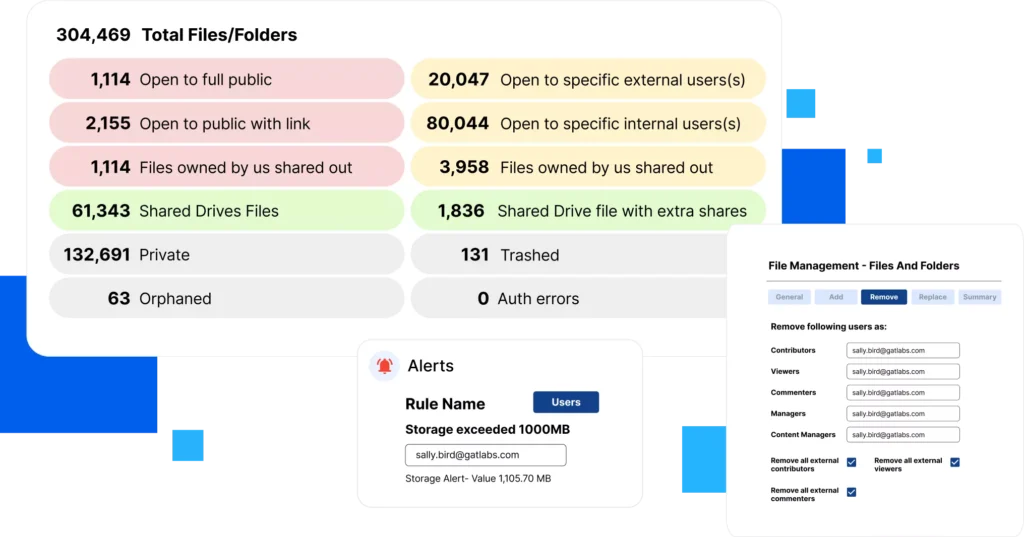
- Deep Drive analytics: map every file share and remediate external exposure instantly
- User activity auditing: track file access, email interactions, sharing events, and domain-wide configurations
- Block high-risk apps by policy across specific OUs or your entire domain
- Schedule recurring audit reports for compliance and governance

Real-Time Chrome DLP
Zero Trust doesn’t end after login. Browser activity is one of the biggest visibility gaps in Google Workspace. GAT Shield provides real time browser monitoring and policy enforcement to help stop data leaving your organization.
- Shadow AI blocking: stop users from uploading sensitive data to ChatGPT or unauthorised web apps
- Session visibility: monitor downloads, uploads, and site visits in real-time
- Active policy enforcement: automatically close tabs or block extensions that violate security policies
- Track Chrome extension installations across your fleet
- Monitor Chromebook usage and enforce access policies at device level
Privileged Access Governance
Zero Trust requires that even admins prove their access is justified. GAT Unlock is a multi-party approval system that enforces this for every sensitive action, whether accessing a user’s Gmail, reading a Drive file, or making a bulk permission change.
- The second key system: requires a designated Security Officer to approve sensitive data access
- Time-scoped access: grant temporary permissions that expire automatically
- Full audit trail: log the reason for every sensitive access request for compliance
- Supports HR investigations, compliance audits, and data retrieval workflows

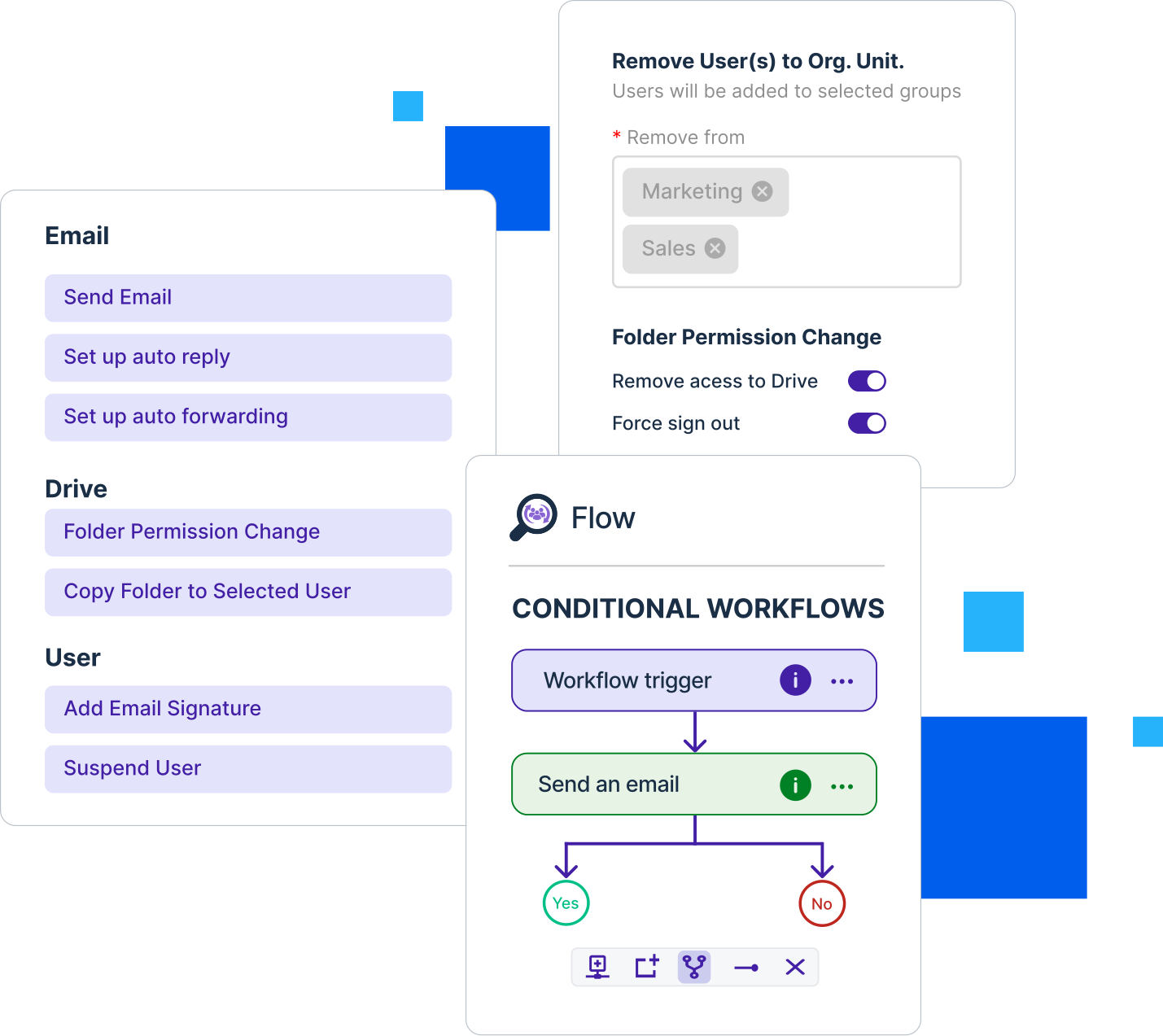
Automated Identity Governance
Human error is the biggest risk in Zero Trust. If offboarding is manual, accounts stay active. If onboarding is inconsistent, permissions are misconfigured. GAT Flow removes human error from these processes entirely.
- Zero-touch offboarding: instantly revoke all app tokens and suspend account access
- Permission management: automate role changes, OU moves, and group updates as part of structured workflows
- Build custom approval workflows for sensitive bulk actions
- Workflow builder, no coding required
- Full audit log for every automated action
Where Google Workspace Ends and GAT Labs Extends
Google Workspace provides strong identity and access controls for a Zero Trust foundation. GAT Labs extends those capabilities with browser visibility, governance, automation, and continuous monitoring to help organizations implement a complete Zero Trust strategy.
|
Zero Trust Principle
|
Google Workspace
|
GAT Labs
|
|---|---|---|
|
Verify Every Identity
|
MFA, Context Aware Access
|
Multi Party Approval, Identity Auditing
|
|
Enforce Least Privilege
|
Access controls
|
Continuous permission auditing and remediation
|
|
Monitor Every Action
|
Admin and audit logs
|
Browser activity, Drive, Gmail, OAuth, real time alerts
|
|
Protect Sensitive Data
|
DLP, sharing controls
|
Browser DLP, Shadow AI protection, bulk sharing remediation
|
|
Automate Governance
|
Manual administration
|
Automated onboarding, offboarding, and workflows
|
GAT Labs secures what happens next. Together, they help you implement a complete Zero Trust strategy.
How to Implement Zero Trust in Google Workspace
Zero Trust isn’t a feature you turn on. It’s a continuous process of reducing trust, verifying access, and monitoring activity across your Google Workspace environment.
01
Audit your current exposure
Use GAT+ to run a full audit of third party applications, externally shared files, Gmail activity, and user permissions.
Identify your highest risk areas first.
02
Reduce Unnecessary Access
Reduce unnecessary access by revoking high-risk OAuth applications, removing overshared files, and creating application allowlists and blocklists based on real risk data.
03
Extend control to Chrome
Deploy GAT Shield to monitor and enforce browser level policies.
Prevent sensitive data from reaching unauthorized websites and AI tools.
04
Automate Governance
Use GAT Flow to automate user lifecycle management and GAT Unlock to require approval for sensitive administrative actions.
Zero Trust becomes part of your daily operations.
05
Review & Improve
Schedule recurring audits, review permission changes, investigate alerts, and adjust policies as your environment evolves.
Zero Trust is an ongoing process, not a one time project.
Zero Trust in
Google Workspace
What is Zero Trust security in Google Workspace?
Zero Trust in Google Workspace means that no user, device, application, or administrator is trusted automatically. Every request to access data should be verified based on identity, device, risk, and policy before access is granted.
Google Workspace provides strong identity controls such as Multi Factor Authentication and Context Aware Access. A complete Zero Trust strategy extends beyond authentication by continuously monitoring activity, limiting permissions, and protecting sensitive actions across the entire environment.
Does Google Workspace include built in Zero Trust controls?
Yes. Google Workspace includes several important Zero Trust capabilities, including Multi Factor Authentication, Context Aware Access, and BeyondCorp Enterprise.
However, these controls focus primarily on authentication and access. They do not provide browser level visibility, OAuth application governance, multi party approval for sensitive admin actions, or automated lifecycle management. Organizations often add additional security controls to close these gaps.
What are the biggest Zero Trust security gaps in Google Workspace?
The most common security gaps appear after users successfully authenticate. These include third party OAuth applications with excessive permissions, browser based data transfers, overshared Drive files, Shadow AI usage, privileged administrator actions, and manual onboarding or offboarding processes.
Without visibility into these activities, organizations can struggle to detect unauthorized access, data exposure, and policy violations before they become security incidents.
How do I implement Zero Trust in Google Workspace?
Implementing Zero Trust is an ongoing process rather than a single setting. It starts by auditing your current environment, reducing unnecessary access, enforcing least privilege, monitoring user activity, and automating governance wherever possible.
As your environment changes, permissions, policies, and security controls should be reviewed regularly to maintain a strong Zero Trust posture and reduce operational risk over time.
How does GAT Labs support a Zero Trust strategy?
GAT Labs extends Google Workspace with additional visibility, governance, automation, and browser security controls that help organizations implement a more complete Zero Trust model.
GAT+ audits users, files, and third party applications. GAT Shield monitors and protects browser activity in real time. GAT Unlock adds multi party approval for sensitive administrator actions, while GAT Flow automates lifecycle management and governance to reduce manual risk and improve operational security.
Learn More About Zero Trust in Google Workspace

Zero Trust in Google Workspace: What It Actually Means for Admins
Read the blog
Zero Trust Offboarding: Why Manual Processes Fail
Read the blog
Zero Trust Maturity for Google Workspace
Read the blogStop trusting by default.
Start verifying everything.
Discover what your Google Admin console isn't showing in your first 24 hours. No commitment required.
