
A user receives what appears to be a routine Google Drive notification.
They click the link, approve an application, and move on with their day.
No malware is installed. No password is stolen. No security alert is triggered.
Yet within minutes, an attacker may have access to email, files, contacts, calendars, and sensitive company data.
This is what many modern email attacks look like.
Today’s phishing attacks rarely end when the email reaches the inbox. The real objective is gaining access to data, establishing persistence, and expanding access across the organization.
Understanding how attackers move from a phishing email to data exposure can help Google Admins identify risks earlier and respond faster when an incident occurs.
Key Takeaways
| Key Takeaway | Why It Matters |
|---|---|
| Modern email attacks often rely on OAuth approvals, QR codes, and social engineering rather than traditional malware. | Attackers increasingly target user behavior instead of devices. |
| Attackers frequently establish persistence through forwarding rules, mailbox delegations, and third-party app access. | These changes can allow attackers to maintain access long after the original phishing email is removed. |
| A compromised account can provide access to Gmail, Google Drive, Shared Drives, contacts, and sensitive business data. | The impact often extends far beyond a single mailbox. |
| Attackers often attempt to expand access after the initial compromise. | The first compromised account is often only the starting point. |
| Visibility across user activity, sharing behavior, and account changes is critical for early detection. | The sooner administrators identify suspicious activity, the faster they can contain the incident. |
Stage 1: Initial Access
Most organizations picture phishing as a fake login page designed to steal credentials.
While credential theft still happens, attackers increasingly use other methods to gain access.
A phishing email may contain a QR code that directs users to a malicious website. It may encourage users to approve a third-party application through a legitimate Google consent screen. In some cases, attackers use AI-generated emails that closely resemble legitimate communications from vendors, executives, or internal departments.
Attackers no longer need advanced technical skills to launch convincing campaigns. Phishing-as-a-Service (PhaaS) platforms provide ready-made phishing kits, hosting infrastructure, and credential collection tools. These services lower the barrier to entry and allow attackers to launch campaigns at scale.
The goal remains the same: convince the user to take an action that grants access.
For administrators, this means a phishing investigation should extend beyond passwords and login activity. Many modern compromises begin with actions users willingly take themselves.
The Modern Attack Chain
Most phishing articles focus on the email itself.
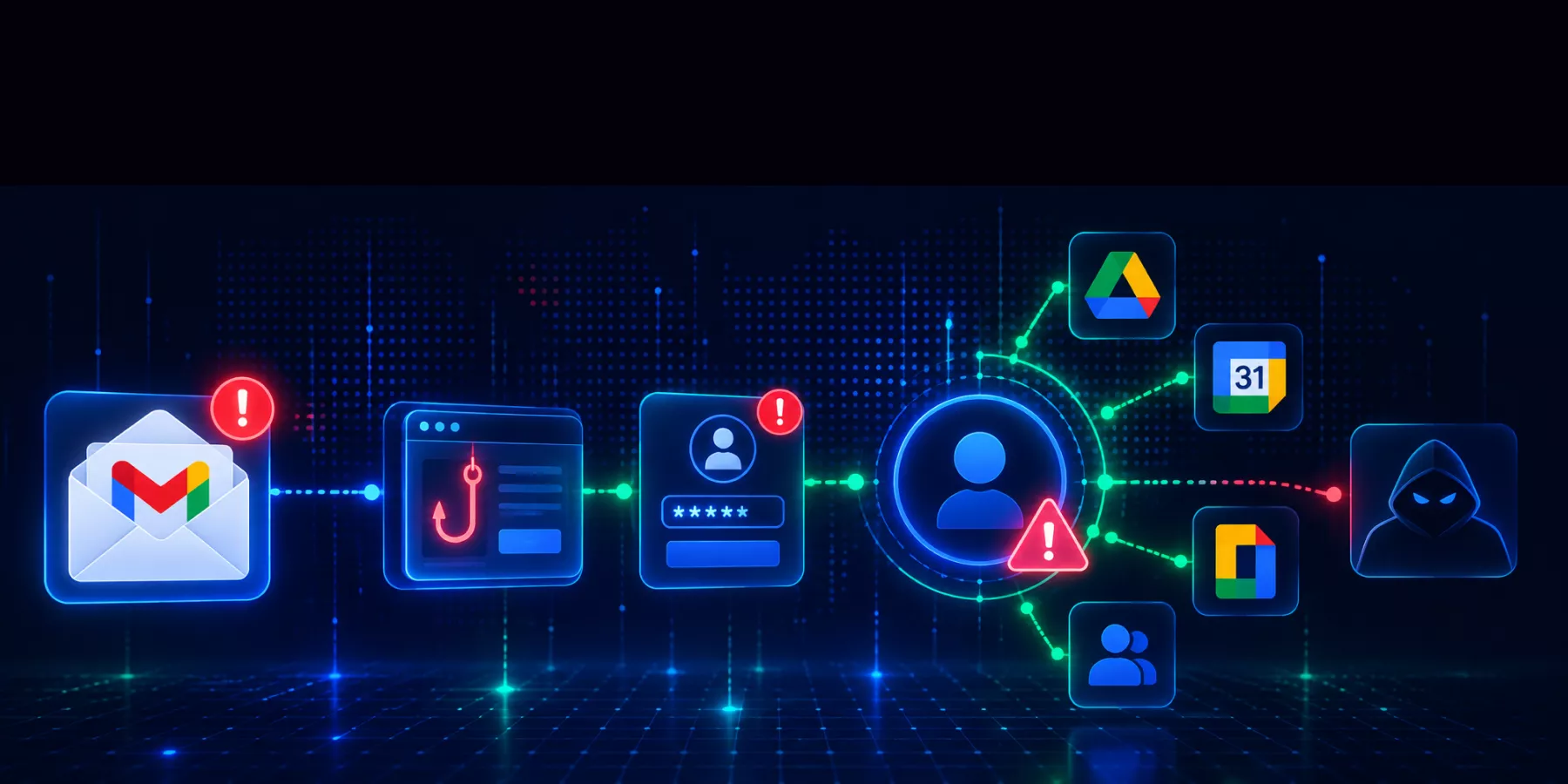
The reality is that the email is only the starting point. Once a user interacts with a phishing message, attackers typically follow a predictable sequence of actions designed to maintain access, locate sensitive data, and expand their reach across the environment.
Understanding this attack chain can help Google Admins identify where an attack currently sits, what warning signs to look for, and which actions to take next.

By the time a user reports the original email, the attacker may already be several stages further along.
Stage 1: Initial Access
Most organizations picture phishing as a fake login page designed to steal credentials.
While credential theft still happens, attackers increasingly use other methods to gain access.
A phishing email may contain a QR code that directs users to a malicious website. It may encourage users to approve a third-party application through a legitimate Google consent screen. In some cases, attackers use AI-generated emails that closely resemble legitimate communications from vendors, executives, or internal departments.
Attackers no longer need advanced technical skills to launch convincing campaigns. Phishing-as-a-Service (PhaaS) platforms provide ready-made phishing kits, hosting infrastructure, and credential collection tools. These services lower the barrier to entry and allow attackers to launch campaigns at scale.
The goal remains the same: convince the user to take an action that grants access.
For administrators, this means a phishing investigation should extend beyond passwords and login activity. Many modern compromises begin with actions users willingly take themselves.
Stage 2: Establishing Persistence
Once attackers gain access, they often focus on maintaining it.
One common technique is creating Gmail forwarding rules that automatically send copies of messages to external accounts. Others may modify inbox filters, create mailbox delegations, or rely on OAuth permissions that continue functioning long after the original phishing email disappears.
These persistence mechanisms allow attackers to monitor communications without repeatedly logging into the account.
Because users rarely notice these changes, attackers can sometimes maintain access for extended periods before anyone identifies the compromise.
This is why reviewing forwarding rules, mailbox delegations, and third-party application access should be a standard part of any Google Workspace security review.
Stage 3: Exploring the Environment
Attackers rarely stop after accessing a single mailbox.
Once inside an account, they often begin searching for information that can help them expand access or locate valuable data.
They may review email conversations, search for financial documents, identify privileged users, examine Google Drive content, or look for shared folders containing sensitive information.
In many cases, the compromised account serves as a starting point rather than the final target.
Organizations in healthcare, financial services, technology, government, and professional services often store large amounts of valuable information inside Google Workspace. A single compromised account can provide visibility into far more than administrators expect.
Stage 4: Accessing and Exposing Data
After locating valuable information, attackers typically focus on collecting it.
This may involve downloading files, reviewing sensitive emails, exporting contact information, or creating external shares that provide continued access to data.
Google Drive often becomes a primary target because it contains contracts, financial records, intellectual property, employee information, customer data, and collaborative project files.
At this stage, the impact of the attack extends beyond account compromise. Organizations must determine whether sensitive information was exposed, downloaded, or shared outside the domain.
For many businesses, understanding potential data exposure becomes the most important part of the investigation.
Stage 5: Expanding Access
Sophisticated attackers rarely stop at one account.
After gaining access, they often search for opportunities to expand their reach across the environment.
They may identify shared mailboxes, review group memberships, target finance teams, examine delegated access relationships, or search for accounts with elevated privileges.
The objective is simple: increase access to data while reducing the likelihood of detection.
This stage often creates the greatest risk because the original phishing email may no longer be the primary concern. The attacker has already moved beyond the initial compromise and is working to establish broader access across the organization.

Warning Signs Google Admins Should Watch For
| Warning Sign | What to Do |
|---|---|
| Suspicious login activity or unfamiliar devices | Review sign-in history, active sessions, and device activity. |
| New forwarding rules, mailbox delegations, or inbox filters | Verify they are legitimate and remove unauthorized changes. |
| Recently approved OAuth applications | Review granted permissions and revoke unnecessary access. |
| Unusual Google Drive downloads or file access | Investigate file activity and identify potentially exposed data. |
| New external shares or collaborators | Review sharing permissions and remove unauthorized access. |
| Unexpected role, permission, or group membership changes | Audit recent changes and verify they were approved. |
Why Modern Phishing Investigations Need More Than Email Visibility
Many organizations still treat phishing as an email security problem.
The reality is that phishing attacks often move quickly into Google Drive, third-party applications, sharing settings, and account permissions.
By the time users report a suspicious message, attackers may already have established persistence or accessed sensitive information elsewhere in the environment.
That is why effective Google Workspace phishing protection depends on visibility across the entire environment, not just the inbox.
The faster administrators can understand how attackers move through an account, the faster they can contain threats and reduce risk.
Download the Google Workspace Phishing Response Checklist
Understanding how attackers compromise accounts is only the first step.
When an incident occurs, administrators need a clear process for investigating activity, assessing potential data exposure, and containing threats quickly.
Download the Google Workspace Phishing Response Checklist for a step-by-step process to contain threats, investigate suspicious activity, assess potential data exposure, and respond faster when incidents occur.
FAQ’s
How do Google Workspace accounts get compromised?
Attackers commonly use phishing emails, QR code phishing attacks, OAuth consent scams, credential theft, and social engineering techniques to gain access to Google Workspace accounts.
Can attackers access Google Drive after compromising an account?
Yes. A compromised account may provide access to Google Drive, Shared Drives, Gmail, contacts, calendars, and other Workspace services based on the permissions available to that user.
What are common signs of account compromise in Google Workspace?
Common indicators include unusual login activity, new forwarding rules, mailbox delegations, suspicious OAuth application approvals, unexpected external sharing, and unusual file access patterns.
Why do attackers create forwarding rules in Gmail?
Forwarding rules allow attackers to monitor communications and maintain visibility into emails without repeatedly accessing the compromised account.
Can a phishing attack compromise an account without stealing a password?
Yes, a phishing attack can compromise a Google Workspace account without a password by using OAuth application scams. In these attacks, a user is tricked into granting data permissions to a malicious third-party app via a legitimate Google consent screen
Can attackers maintain access after a password reset?
Yes, attackers can maintain access to a compromised Google Workspace account after a password reset if they have established persistence. This is typically achieved through malicious Gmail forwarding rules, mailbox delegations, or active OAuth tokens. Administrators should review these settings during every compromise investigation.