When ChatGPT became mainstream, many organizations asked the same question:
“Should we block it?”
A year later, most have realized that’s probably the wrong question.
Employees aren’t using AI because they’re trying to work around IT. They’re using it because it helps them get through the day faster. They summarize documents, write emails, explain formulas, review code, and brainstorm ideas. AI has become another browser tab that’s open alongside Gmail, Google Drive, and Google Meet.
The challenge isn’t that people are using AI. It’s that many organizations have very little visibility into how it’s being used.
That’s where the concept of Shadow AI comes in.
Shadow AI refers to employees using AI tools without the visibility, governance, or approval of their organization. Sometimes it’s a personal ChatGPT account. Sometimes it’s a free AI assistant someone found online. Sometimes it’s an AI feature embedded inside another application that IT didn’t even realize was there.
From the employee’s perspective, they’re simply getting work done.
From the administrator’s perspective, company data may now be leaving the organization in ways that never appear in traditional Google Workspace audit logs.
AI Is Becoming Part of Everyday Work
This isn’t a niche trend anymore.
According to the 2026 State of Browser Security Report, 41% of enterprise users interacted with AI web tools during 2025, with employees using an average of 1.91 different AI applications each.
That’s a remarkable shift in a relatively short period of time. AI has gone from something employees experimented with to something many rely on every day.
For Google Admins, that changes the conversation. The question is no longer “Are people using AI?” It’s “How do we govern AI use without slowing everyone down?”
Is Shadow AI Actually a Security Risk?
The answer depends on how it’s used.
Most employees aren’t intentionally exposing sensitive information. They’re looking for faster ways to complete everyday tasks, whether that’s summarizing meeting notes, reviewing code, translating documents, or drafting emails.
The problem is that convenience can sometimes come at the expense of visibility.
An engineer troubleshooting an application might paste proprietary source code into an AI assistant. A finance team could upload a spreadsheet to generate a summary for an executive meeting. An HR manager might ask an AI tool to rewrite employee feedback before performance reviews.
These actions aren’t malicious, but they can still move confidential information outside the organization’s managed environment.
That’s why Shadow AI should be viewed as a governance challenge as much as a security one. The objective isn’t to stop employees from using AI. It’s to understand where sensitive information is going and reduce unnecessary risk.
Isn’t This Just Another Data Loss Prevention Problem?
Not exactly.
Traditional Data Loss Prevention works well when information moves through systems you already manage, such as Gmail or Google Drive.
Shadow AI changes that.
Imagine an engineer trying to understand why an application failed. Instead of sending code to a colleague, they paste it into an AI assistant for help.
Or imagine someone in HR asking an AI tool to rewrite performance reviews before sending them to managers.
Neither employee is trying to leak data. They’re trying to save time.
But in both cases, sensitive information has left the organization’s managed environment.
No email was sent, no Drive file was shared, and no traditional DLP policy was triggered. Everything happened inside the browser.
That’s why browser activity has become such an important part of modern data protection.
Why Doesn’t Google Workspace Show Me This?
This is one of the questions we hear most often.
Google Workspace provides excellent visibility into activity happening inside Workspace itself. You can audit file sharing, email activity, login events, administrative changes, and much more.
What it doesn’t always show is what happens after a user opens another browser tab.
If someone uploads a document to an external AI platform, copies confidential information into an online assistant, or downloads sensitive files before leaving the company, those actions may fall outside traditional Workspace auditing.
This isn’t a limitation of Google Workspace. It’s simply a reflection of how work has evolved.
Employees spend much of their day moving between Google Workspace and dozens of other web applications. Understanding that browser activity provides valuable context that complements your existing audit data.
Should Organizations Ban AI?
In most cases, probably not.
Blanket bans rarely solve the problem. People still need to be productive, and AI is quickly becoming another business tool.
A better approach is governance.
Start by understanding which AI platforms people actually use. Decide which tools are approved for business use and communicate clear expectations around sensitive information.
From there, focus on visibility rather than restriction.
If someone uploads confidential information to an unapproved AI platform, you want to know about it. If an investigation takes place six months later, you want browser activity to help explain what happened.
That’s a very different objective than simply blocking websites.
What Should Google Admins Be Monitoring?
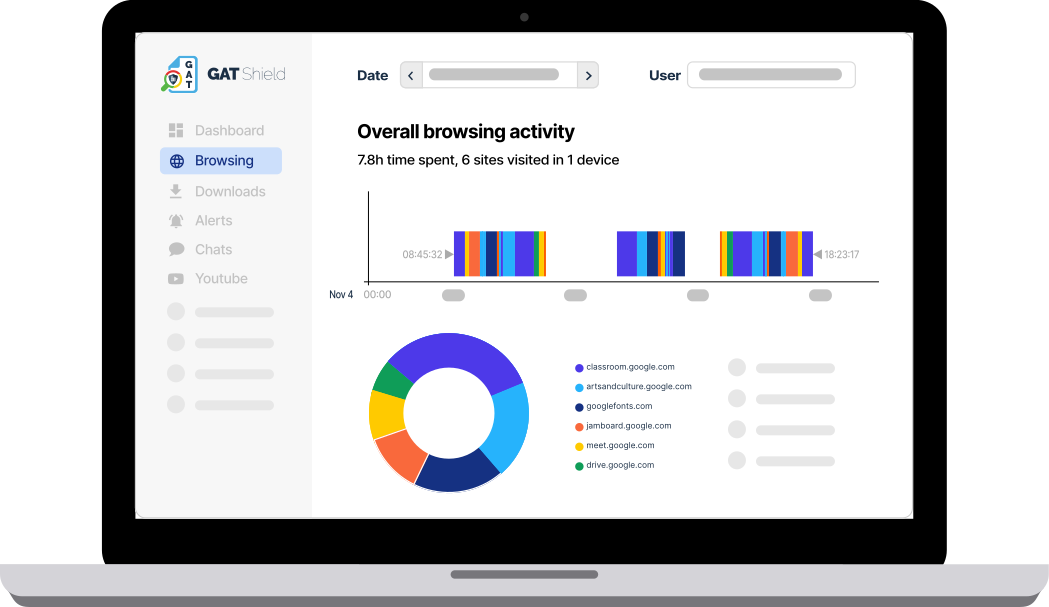
Browser activity doesn’t replace Google Workspace audit logs. It complements them.
Uploads and downloads remain one of the clearest indicators of how information moves between Google Workspace and external services. If users are uploading sensitive information to AI tools or downloading files before leaving the organization, these activities can provide valuable context during an investigation. GAT Shield helps administrators monitor browser uploads and downloads across managed devices. If you’d like to learn more, see Tracking Uploads Across the Entire Browser with GAT Shield.
Chrome extensions are another area worth reviewing regularly. While many extensions are perfectly legitimate, some request extensive permissions or become risky after updates or ownership changes. Auditing installed extensions can help identify unnecessary or high-risk browser access.
AI interactions are also becoming an important part of modern governance. Understanding which AI platforms employees use, and whether sensitive information is being shared with approved or unapproved services, provides valuable context during security investigations and compliance reviews.
Finally, browser activity should always be considered alongside Google Workspace audit logs rather than separately. Together, they provide a much more complete picture of user activity before, during, and after a security incident.
Frequently Asked Questions
What is Shadow AI?
Shadow AI refers to the use of AI tools and applications without formal approval or oversight from an organization’s IT or security team. This can include public AI assistants, browser extensions, or SaaS applications that employees use to process business information.
Why is Shadow AI a security risk?
Shadow AI can increase the risk of sensitive information being shared outside approved systems. Employees may unintentionally upload confidential documents, customer data, or proprietary information to AI services that aren’t covered by existing security policies.
Can traditional data loss prevention (DLP) stop Shadow AI?
Traditional DLP solutions remain an important part of a security strategy, but they may not provide visibility into every browser interaction. Browser-level monitoring can help organizations understand how data is being used across AI tools and websites.
How can Google Admins reduce Shadow AI risks?
Organizations can reduce Shadow AI risks by establishing clear AI usage policies, educating employees, monitoring browser activity, reviewing browser extensions, and using tools that provide greater visibility into uploads, downloads, and interactions with AI websites.
Is banning AI tools the best approach?
Not necessarily. Many organizations benefit from AI tools when they’re used responsibly. Rather than banning AI completely, it’s often more effective to combine clear policies, user education, and browser security controls that provide visibility into how AI is being used.