

GAT Shield gives Google Workspace Admins a powerful way to manage what users can see on the web. Instead of blocking sites one by one, you can block them in bulk for specific people, entire groups, or whole departments (Organizational Units).
What’s New? #
Previously, you might have had to set up several different rules to block different types of sites. Now, we’ve added a Multi-Category Feature.
This allows you to bundle several categories, both those you’ve made yourself and the ones we provide, into a single rule.
The Multi-Category feature lets you combine your own lists with GAT Shield’s massive, pre-built databases. This stops the “manual hunt” for new websites to block.
- Custom categories: Your specific lists. Use these for internal sites or any list of sites you want to block, and they are suitable for your domain needs.
- Predefined categories: Our predefined/system categories. These lists cover millions of websites (like Social Media, AI, or Adult content). They update automatically, so you don’t have to manually add new URLs to keep your filters current.
Quick Reference: System Categories #
Here is a look at some of the pre-defined categories you can now mix and match with your custom user-defined categories.
- ads: All known advertising domains. (7,327)
- ai: AI tools like ChatGPT, Claude, and Gemini. (71)
- all: Blocks every single URL. (0)
- porn: Websites that host, promote, or distribute pornographic or sexual content. (5320957)
- cipa_compliant: Essential for schools; blocks porn, drugs, hate speech, and many more categories. (8,389,859)
Key Benefits #
- Mix and Match: You can combine a “Custom” list of local news sites with a “System” list, such as “Social Media,” into a single simple rule.
- Saves Time: You no longer need to create 10 different rules for a single group of students or employees.
- Scale: With categories like “CIPA Compliant” covering over 8 million sites, you get instant protection without any manual work.
Apply the Combined Rule #
Navigate to GAT Shield > Site Access Control > Rules.
Click on the + New rule button to create a new category and add all the categories you want combined.
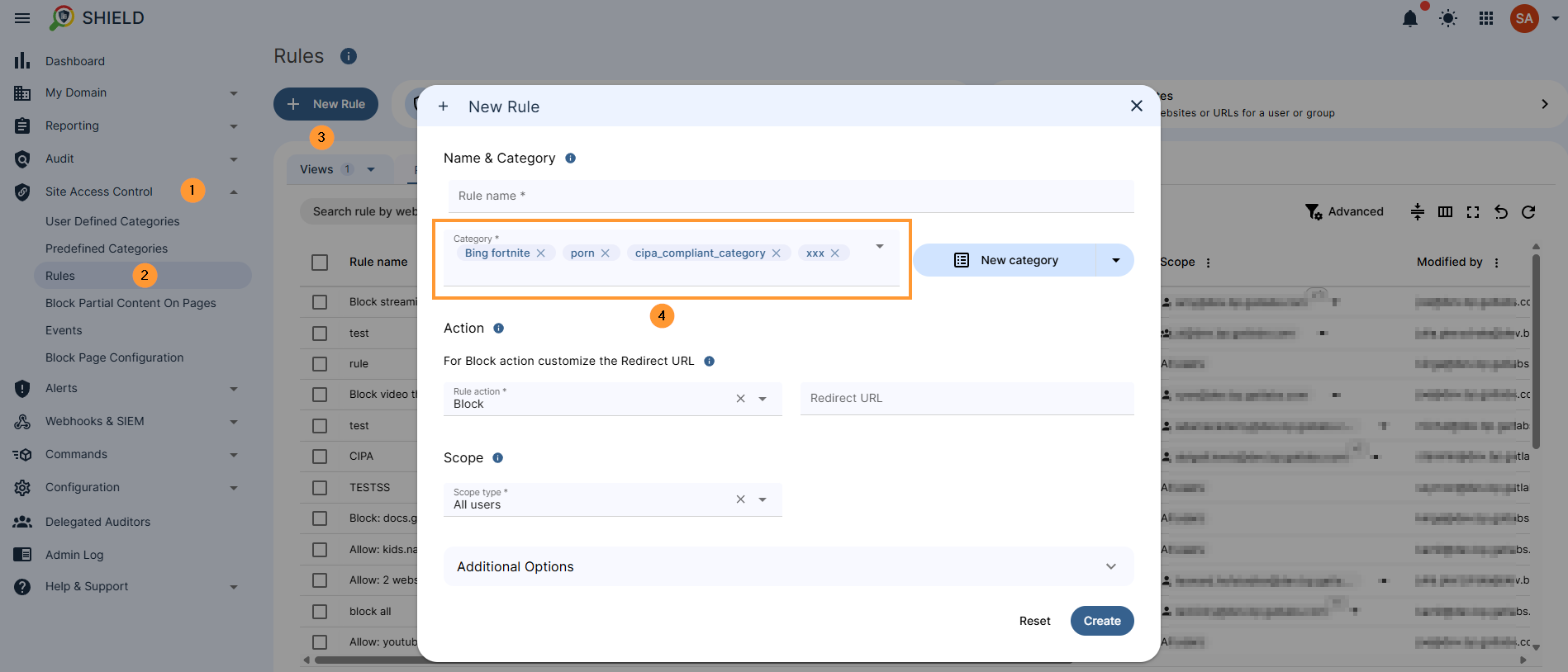
Continue and create the rule.
Result #
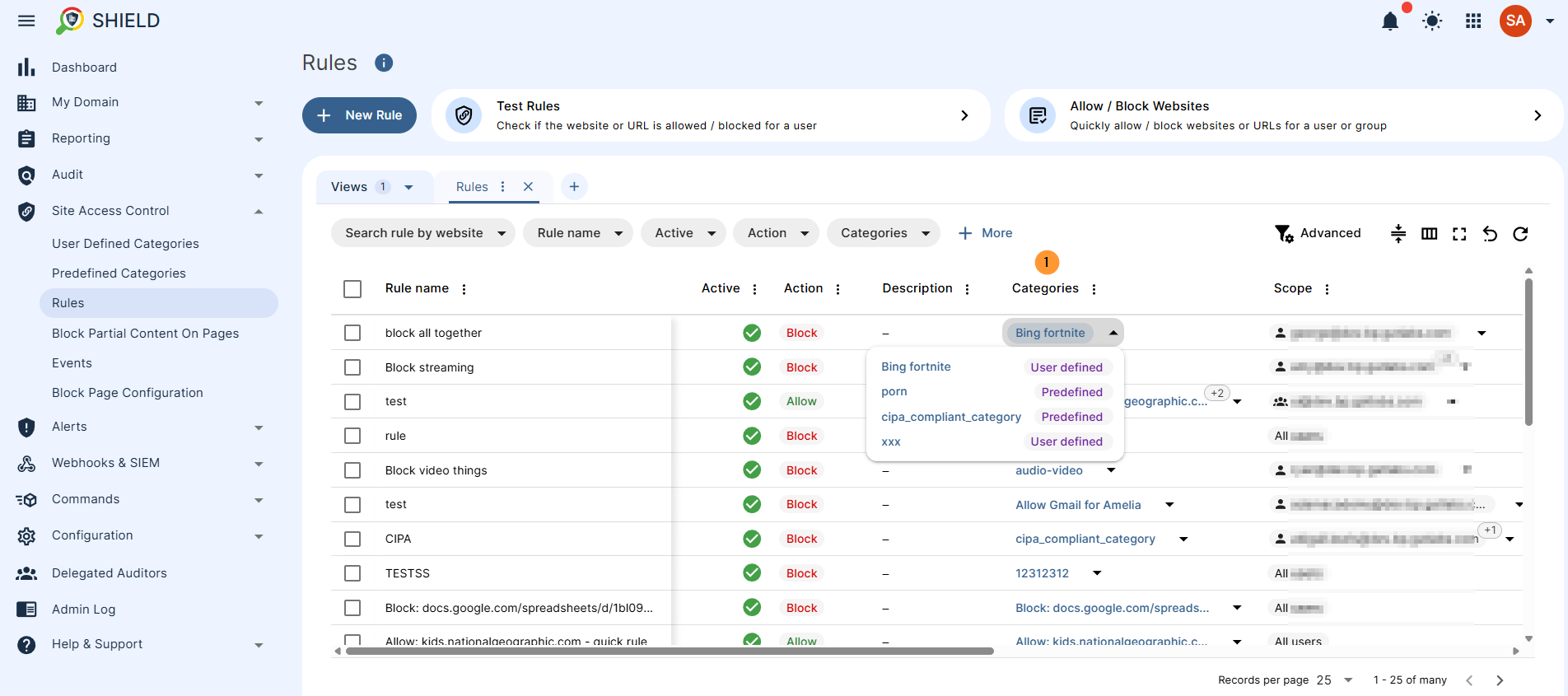
The rule will be created and will include all the selected categories, custom created list of sites, as well as the predefined categories.
Conclusion #
The addition of the Multi-Category Feature in GAT Shield significantly streamlines web filtering for Administrators.
By allowing the combination of manually curated “Custom Categories” with massive, auto-updated “System Categories” into a single rule, the platform reduces administrative overhead and enhances security.
This update ensures that managing access for specific users or entire departments is faster, more scalable, and easier to maintain.
FAQ #
- Q. Can I combine my own list of websites with the pre-defined system categories?
- A. Yes! The primary benefit of the Multi-Category Feature is the ability to “mix and match.” You can take a Custom Category (like a list of specific local sites you’ve curated) and bundle it with a System Category (like “Social Media” or “AI tools”) into one single, comprehensive rule.
- Q. If I use a System Category like “cipa_compliant,” do I need to update it manually?
- A. No. System categories are managed by a third-party service that covers millions of URLs and updates automatically. This ensures your filtering remains current against new websites without requiring any manual intervention from your IT team.


