
Enhancing Admin Efficiency with the GAT Labs AI Assistant #
In a modern enterprise environment, Google Workspace administrators must manage vast amounts of data. They also handle complex security compliance policies and continuous user audits. However, expecting a team to manually dig through documentation is highly inefficient. Navigating intricate menus for every daily task wastes valuable time. Consequently, this slow manual process delays crucial incident response and administrative workflows.
To solve this problem, GAT Labs offers an intelligent, integrated Assistant.
This feature allows you to input everyday administrative questions. As a result, you receive instant, step-by-step guidance on how to leverage GAT Labs products to achieve your goals.
Why Use the AI Assistant for Your GAT Labs Workflows? #
The primary goal of this integration is immediate operational clarity. By utilizing the AI Assistant, you can completely bypass manual knowledge-base searches. Therefore, you get direct instructions tailored specifically to your administrative goals.
The Practical Benefit: Imagine you receive an alert for a potential phishing attempt. Multiple users across your domain have received a suspicious message. Instead of wasting time digging through documentation, you can act immediately. You simply ask the assistant directly: “How do I find all emails from this specific sender across the organization?” Within seconds, the tool provides the precise navigation paths and filter criteria needed to isolate those messages. Furthermore, it helps you set up an automated threshold alert for future external emails. Ultimately, this transforms a high-stress security incident into an immediate, repeatable, and actionable workflow.
By bridging the gap between your immediate questions and the robust feature set of GAT Labs, you dramatically reduce your time-to-resolution for critical security and management tasks.
How to Access the GAT Labs AI Assistant in GAT+ #
Navigate to GAT+ > Help > Assistant #
-
Navigate to the left-hand menu in GAT+ and click on Help (1) to expand the dropdown menu.
-
Click on Assistant (2).
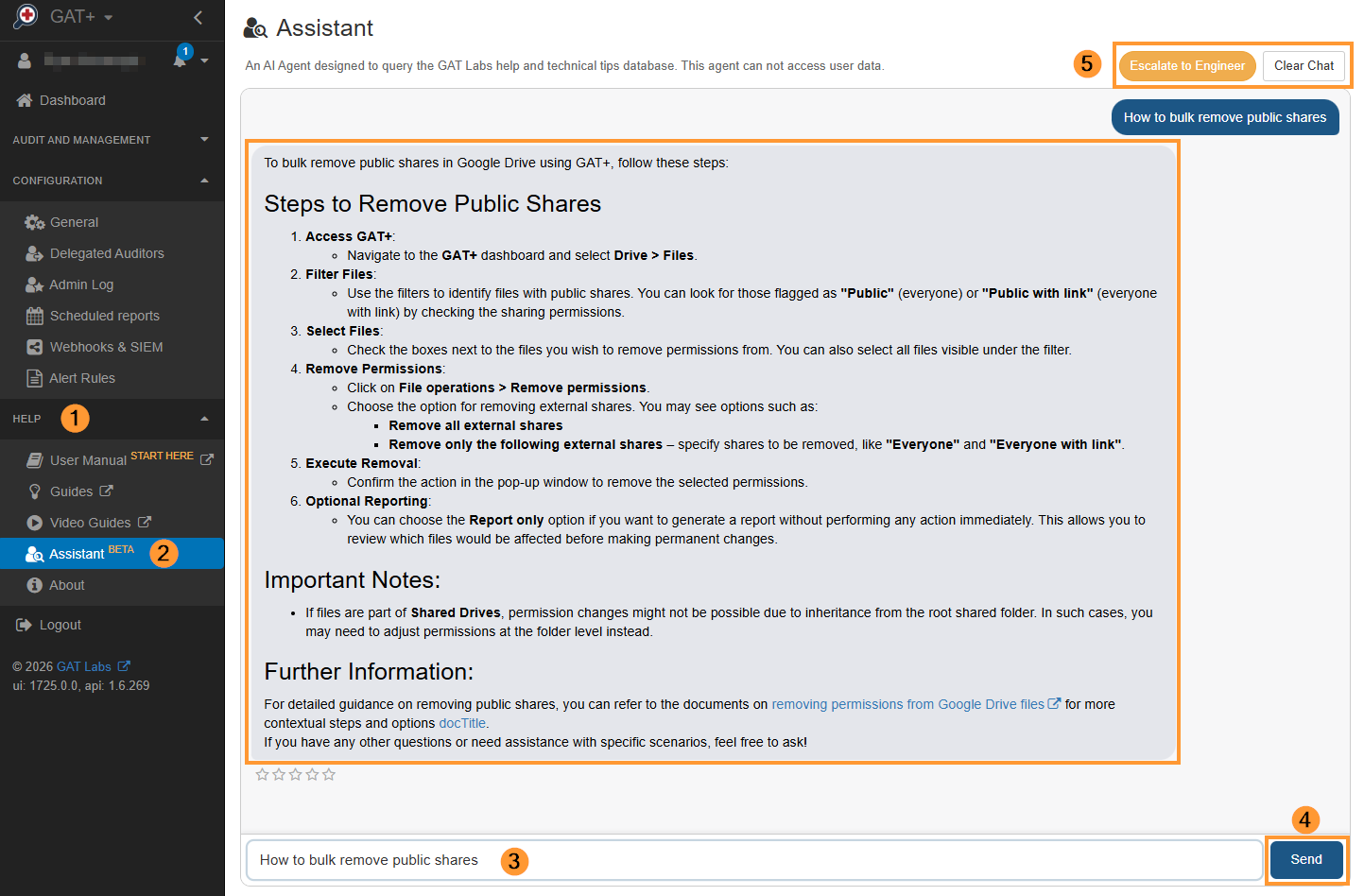
Once inside the Assistant panel, the UI consists of a clean console with specific interactive elements designed to streamline your query process.
-
“Type a message…” (3): The location where you enter your technical or functional questions.
-
Send (4): Submits your current prompt to the assistant.
-
Escalate to Engineer (5): A dedicated escalation trigger that sends your prompt and the AI’s response to an engineer for further investigation.
What Can the AI Assistant Help With? #
The assistant is trained to help you navigate GAT Labs products and quickly answer complex “How-to” scenarios, such as:
-
Data Auditing: “How can I scan for specific data within Google Drive, including identifying files with sensitive information?”
-
DLP Policies: “Can I create a DLP Alert on Externally Shared Google Docs in Drive?”
-
Email Investigation: “How to Find All Emails for a Gmail User?”
-
Alert Rules: “How do I set up an alert for 50 external emails received in the past 24 hours?”
Note: In today’s world, data privacy is paramount. The AI Assistant only scans the official GAT Labs knowledge base to generate its answers. It does not have access to, nor does it look into, any of your domain’s live user data, emails, configurations, or files. Your data remains entirely private and secure.
FAQs #
Q: Does the GAT Labs AI Assistant access live Google Workspace data?
A: No. The AI Assistant operates with strict data boundaries. It only references and processes information from the official GAT Labs knowledge base documentation to provide instructions. It cannot read, scan, or access any live data, emails, file structures, or user logs within your Google Workspace domain.
Q: What should I do if the AI Assistant gives me an incomplete answer or if my query is too complex?
A: If a query requires deep customization or falls outside standard knowledge-base documentation, you don’t need to start over. Simply use the built-in escalation option within the assistant interface to route your current conversation history to a GAT support engineer for further investigation.


