

Activity Report for your Google Workspace domain #
GAT+ as a tool has the potential to create hundreds of different reports for every section of your Google Workspace environment.
Keeping track of everything happening across a busy Google Workspace domain can be a challenge.
The GAT+ Weekly Activity Report simplifies this by giving admins an automatic, bird’s-eye view of their environment every week. Delivered straight to your inbox, this report highlights key trends in file sharing, email traffic, and external collaboration—helping you spot potential security risks and monitor domain activity without having to dig through manual logs.
All domain superadmins will receive this report automatically after installing GAT+.
GAT Activity Report #
The Activity Report is sent by default to all admins once per week. The recipients will receive a weekly email called GAT Activity Report.
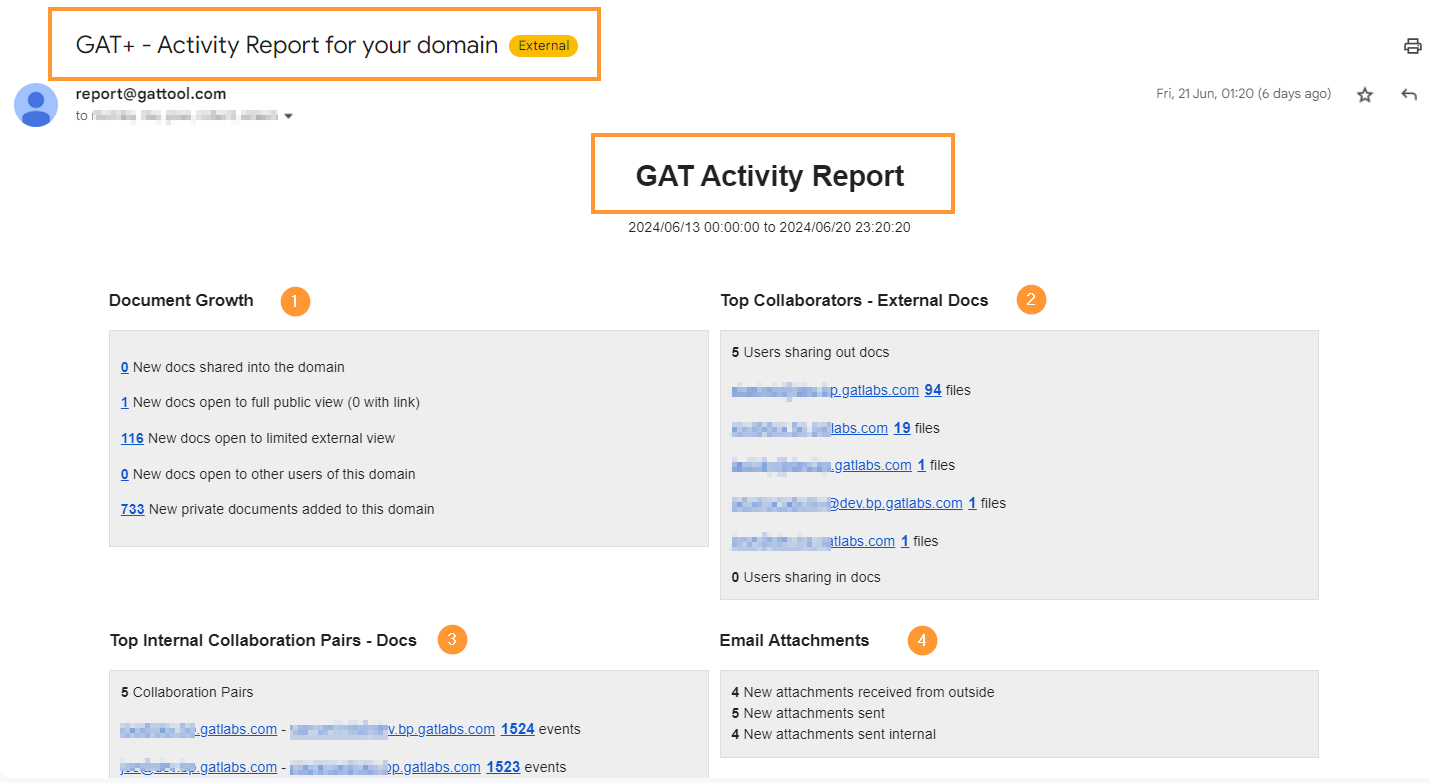
Activity Report Data #
The report will include:
- Document Growth – provides a better spectrum of what has happened in your domain in regard to the drive-sharing permissions. Each of the values is clickable and represents as follows:
- New docs shared into the domain – external docs shared into your domain,
- New docs open to full public view (with link) – local docs to be open to everyone (full public view),
- New docs open to limited external view – your local docs that have been shared with some external users,
- New docs open to other users of this domain – local docs open to other local users,
- New private documents added to this domain – the new private local docs added to the domain;
- Top Collaborators – External Docs – show the top local users who shared out and/or shared the external docs internally in descending order. To view each user’s collaboration, click on the number next to each user and you should be redirected to the GAT+ console that shows relevant metadata:
- Users sharing out docs
- Users sharing in docs;
- New External Domains Collaborating – Docs:
- New domains sharing files with us,
- New domains we are sharing with;
- Top Internal Collaboration Pairs – Docs – refer to the internal collaboration between your local users and it displays collaborating pairs (users’ email addresses involved in the collaboration)
- Top External Collaboration Pairs – Docs – refer to the external collaboration between local users and external users, it displays collaborating pairs (users’ email addresses involved in the collaboration – internal with external);
- Email Attachments:
- New attachments received from outside
- New attachments sent
- New attachments set internal
- Top Email Senders and Receivers:
- New External Domains Collaborating – Emails:
- New domains sending emails to us,
- New domains we are sending emails to;
- Top Internal Collaboration Pairs – Email – refers to the internal collaboration between your local users and it displays collaborating pairs in descending order;
- Top External Collaboration Pairs – Email – refers to the external collaboration between local users and external users; it displays collaborating pairs in descending order.
Edit recipients of the Activity Report #
Any admin can edit the list of admins that will receive the Activity Report.
Navigate to GAT+ → Configuration → General → Reports

The Activity Report will be displayed; click on the (pen icon) under Actions to edit
A pop-up window will be displayed.
- ID – Default is the Activity report
- Recipients – List of recipients for the report
- Add or remove email addresses of the users to receive this report (separate by a comma; a non-admin user can be set too)).
- Status – view the status of the report if enabled or disabled.
- Enabled – the report is enabled
- Disabled – the report is disabled
Exclude ‘From’ Addresses #
- Exclude “From” Addresses – Enter email addresses to be excluded from the Activity report (separate by comma)
- Exclude mailing addresses, automated notifications, etc.

When ready with the changes, click on the “Save” button.
Result #
As a result, all the recipients will receive the Activity report on a weekly basis.
The report will include all the information shown above. The excluded mailing addresses will not be included in the Activity report.

Conclusion #
By customizing your recipients and filtering out noisy automated emails, you can ensure the GAT+ Weekly Activity Report delivers only the most relevant security insights straight to the right people. Set it up once, and let GAT+ keep a weekly pulse on your Google Workspace domain so you don’t have to.


